Option Constraints
Option constraints express relationships between two options in the same bundle — “if they pick A, they also need B,” “A and B can’t both be selected.” They’re a declarative, lighter-weight alternative to writing a Product Rule for the same logic. You author them in the Option Constraints section of the Bundling tab (you need at least two options before you can add one).
The three constraint types
Each constraint points from a Source option to a Target option:
- Requires — when the source is selected, the target is auto-added and locked. The rep cannot deselect the target. (“Select the laptop → the charger is forced in.”)
- Excludes — when the source is selected, the target is auto-removed and locked off. The rep cannot select both. (“Basic and Premium support are mutually exclusive.”)
- Implies (soft default) — when the source is selected, the target is default-selected on first render, but the rep can opt out. (“Select the laptop → the carry case is pre-checked, but optional.”)
The difference between Requires and Implies is the lock: Requires is mandatory (can’t undo), Implies is a suggestion (can undo).
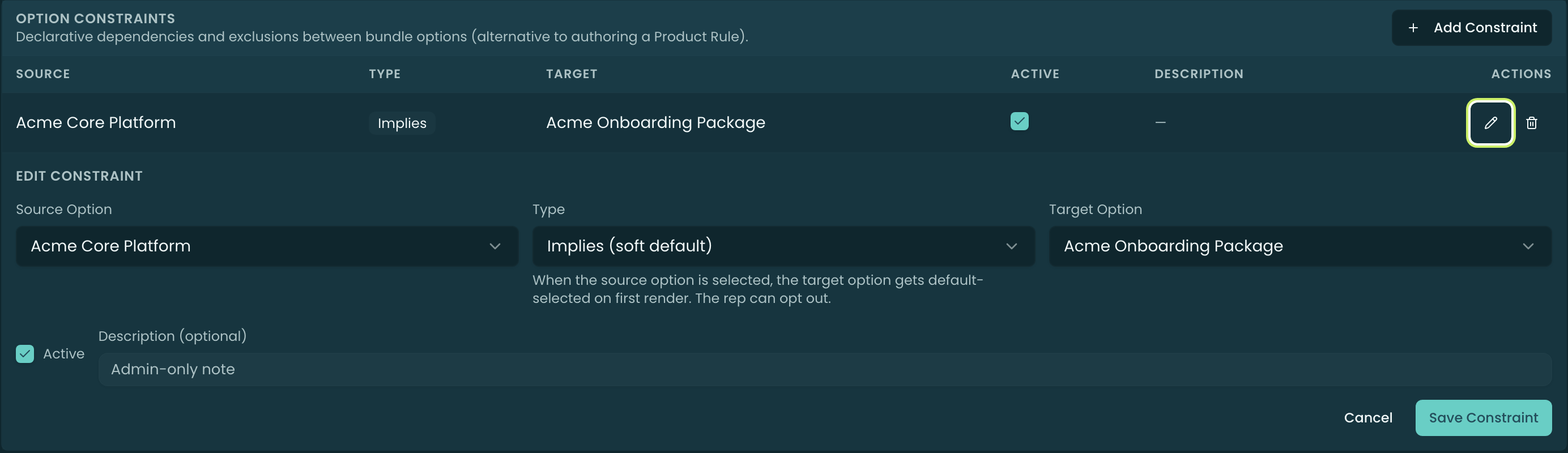
Authoring a constraint
Pick a Source Option, a Type, and a Target Option (the two must differ, and both must be options of the same bundle). An optional Description is an admin-only note, and an Active toggle lets you disable a constraint without deleting it.
Related
- Options — the options a constraint relates.
- Features — min/max selection within a group (a different kind of rule).
- Product Rules — the heavier-weight, cross-product alternative.