Usage Rate Cards
Some products aren’t sold at a flat price — they meter. An API plan includes a bucket of calls and charges for anything over it; a storage tier includes a number of gigabytes and bills the overflow. Pinion models this as a usage-based product: a committed base subscription, an included entitlement, and an overage rate card that prices consumption above the entitlement.
You author all of it per product in Product Manager — the flag, the usage dimension, and the rate card — with no raw Salesforce record pages.
Mark the product Usage-Based
- Open Product Manager on a product and go to the Pricing tab.
- In the Usage-Based Pricing section, check Usage-Based (
UsageBased__c). - Open the Usage Rate Card sub-tab.
The rate card only applies to usage-based products; until the flag is set, the editor shows a nudge to enable it.

Define the usage dimension
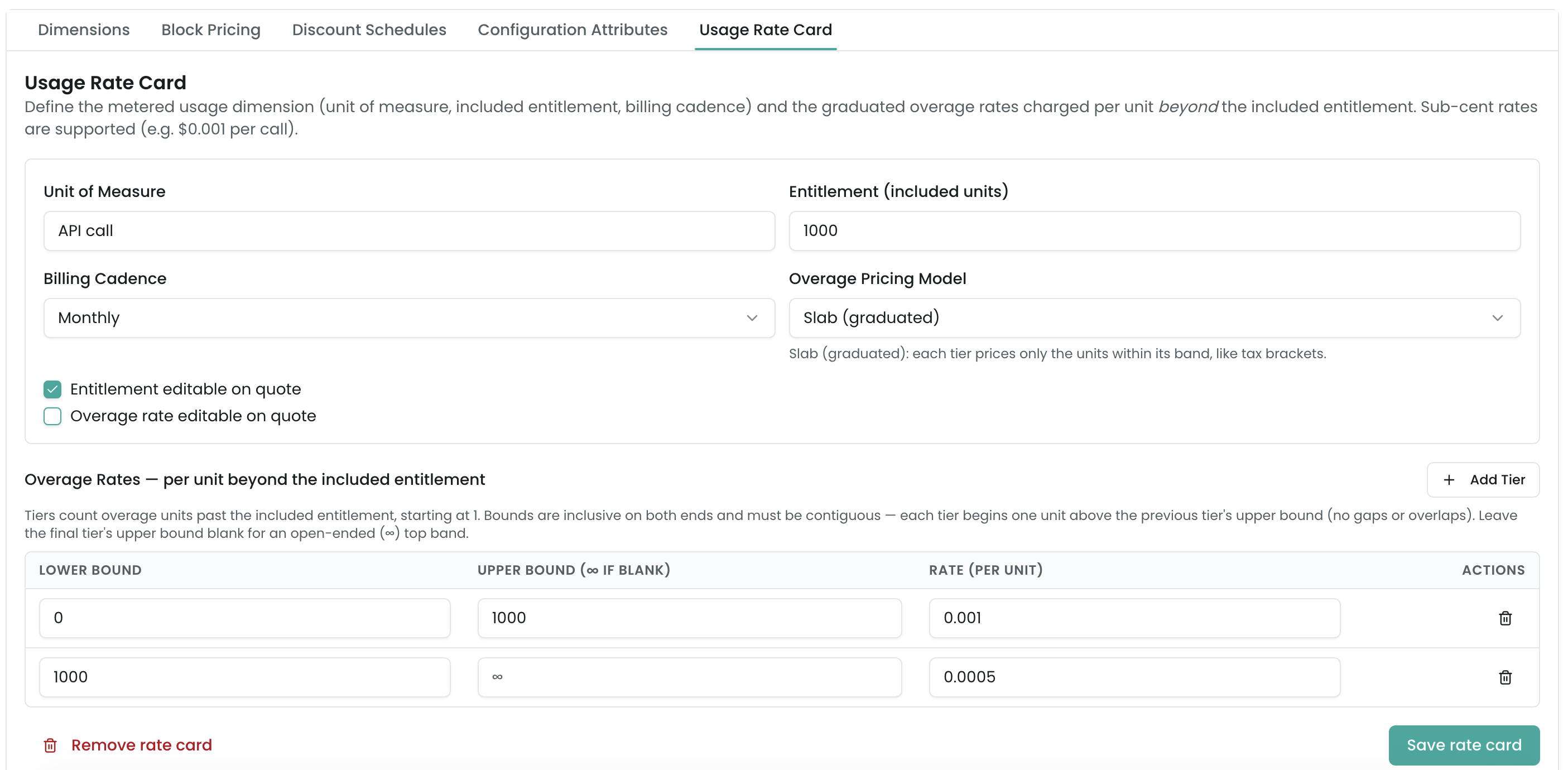
A usage-based product has one usage dimension — the thing being metered — with these fields:
- Unit of Measure — what you count:
API call,GB,seat-hour. Required. - Entitlement (included units) — how many units are included before overage is charged. A line that consumes at or below the entitlement has zero overage.
- Billing Cadence — Monthly, Quarterly, or Annual — the period the entitlement and metering apply over.
- Entitlement editable on quote — lets a rep override the included entitlement on a specific line.
- Overage rate editable on quote — lets a rep override the overage rate on a specific line.
- Renewal Behavior — what happens to the committed entitlement and overage rate when the contract renews. Carry Forward (the default) reuses the terms the customer signed. Uplift carries the entitlement and escalates the rate by the dimension’s Overage Rate Uplift. Reset discards both so the renewal re-prices the meter from whatever the rate card says at renewal time.
The two editability toggles are the usage analog of a price override: leave them off and reps quote at the catalog definition; turn one on and an authorized rep can adjust that term per deal. Either way the server validates the posted terms on save (see How metered pricing works).
Build the overage rate card
The Overage Rates grid defines how units beyond the included entitlement are priced. Each row is a tier — a band of overage units and the per-unit rate that applies to it.
Tier bounds are 1-based and inclusive
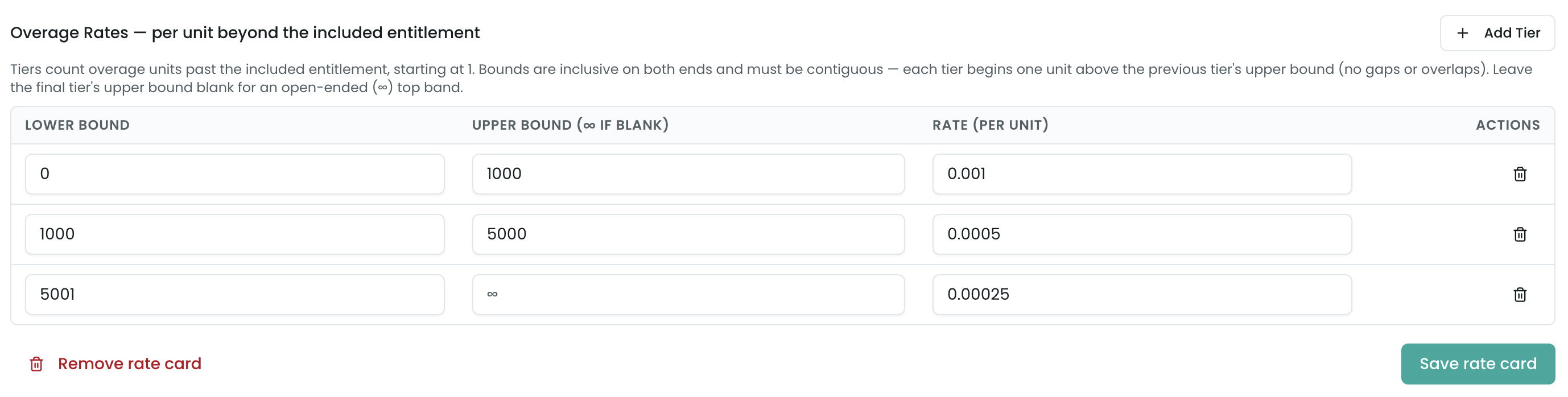
Overage tiers count overage units above the entitlement, not total usage. They are 1-based, inclusive on both ends, and contiguous:
- The first tier starts at 1 — the first overage unit past the entitlement.
- Add Tier auto-fills the new tier’s lower bound to the previous tier’s upper bound + 1, so the bands stay contiguous with no gaps or overlaps.
- Bounds are inclusive/inclusive — a single-unit
[5–5]band is legal; an upper bound must be≥its lower bound. - Only the final tier may be open-ended — leave its upper bound blank for ∞.
This is the same tier convention the Block Pricing and Discount Schedule editors use. Gaps, overlaps, an open-ended non-final tier, or a lower bound below 1 are rejected — both in the editor and again on the server when a quote saves.
Rates can be sub-cent
Metered rates are often fractions of a cent — $0.001 per API call. The Rate field stores six decimal places, so a sub-cent rate persists and reloads at full precision (it never rounds to $0.00).
Choose the Overage Pricing Model
The Overage Pricing Model selector decides how a line’s total overage walks the tiers. It follows the Salesforce CPQ convention:
- Slab (graduated) (default) — each tier prices only the units that fall in its band, tax-bracket style, and the slices are summed.
- Range (volume) — the single tier the total overage lands in prices every overage unit.
On a card whose upper band is cheaper, the two models produce different totals — see the worked example. Slab is preselected, so any card authored without touching this field prices as graduated.
Save and remove
- Save rate card upserts the dimension and the rate header, then replaces the full tier set — the editor is the single source of truth for the tiers.
- Remove rate card deletes the dimension; the rate header and its tiers cascade. You’re asked to confirm first.
Related
- Pricing Methods → Usage & Metered Billing — how the entitlement, overage, and pricing model compose (with the graduated-vs-volume worked example and tamper protection).
- Quoting → Quoting a Metered Deal — the rep-facing usage panel and the quote’s rate-card section.
- Block Pricing — the same 1-based inclusive tier convention for fixed per-band prices.
- Discount Schedules — the same Slab (graduated) / Range (volume) convention for volume discounts.
- Reference → Line Item Fields — the usage fields stamped on the saved line.