Building a Quote
Building a quote is two tabs and a save. On Configure you pick what’s in the deal and shape any bundles, subscriptions, and attributes. On Price you set the numbers — quantities, prices, discounts, terms — and watch the totals reconcile. Then you Save & sync to write it back to the record. Your selections are shared across the tabs, so you can move between them freely without losing work.
This page is the end-to-end workflow. The rule-driven badges, locks, and price explanations that appear along the way have their own reference in Rule Transparency.
The Configure tab — pick and build
The Configure tab is a searchable, grouped catalog of everything you can add to the deal. Search by name, or filter by the product groups in the left rail; click a product to add it to (or remove it from) the quote. The header shows a running count of what’s in the quote.
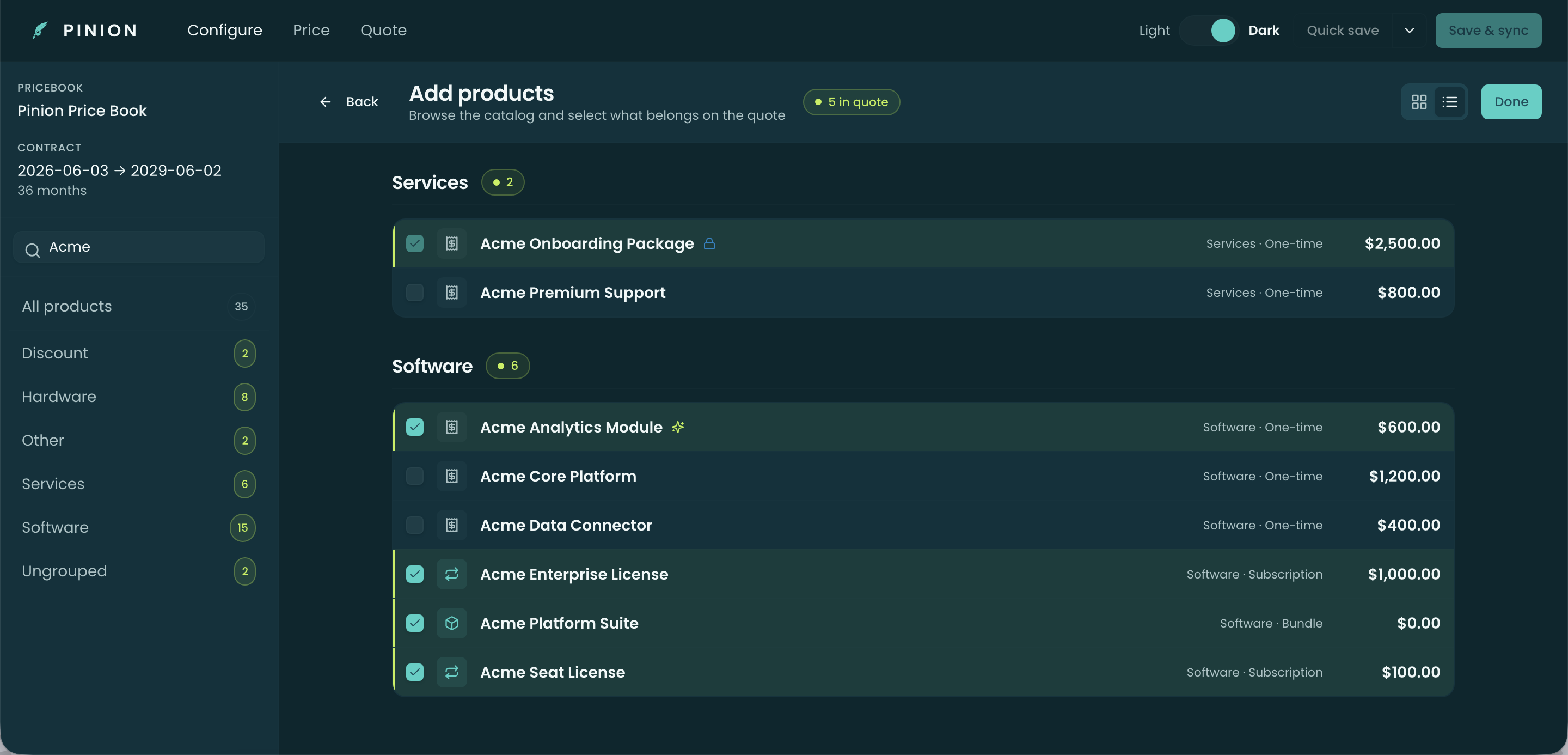
A few product shapes behave specially:
- Bundles — a parent product with options. Add the bundle and open its options drawer (from either tab) to turn options on or off — they’re grouped into Feature tabs, with a search box across all features and a live Selected summary. Options come in flavors — required, default-selected, optional, and rule-hidden — and a bundle carries a pricing model (Standard, Roll-Up, or Itemized) that decides how option prices roll into the parent. See Bundles for the full model.
- MDQ subscriptions — multi-year products that split into per-term segments (Year 1, Year 2, …). You set quantity, uplift, and dates per segment; a mid-term co-term date truncates and prorates the final segment.
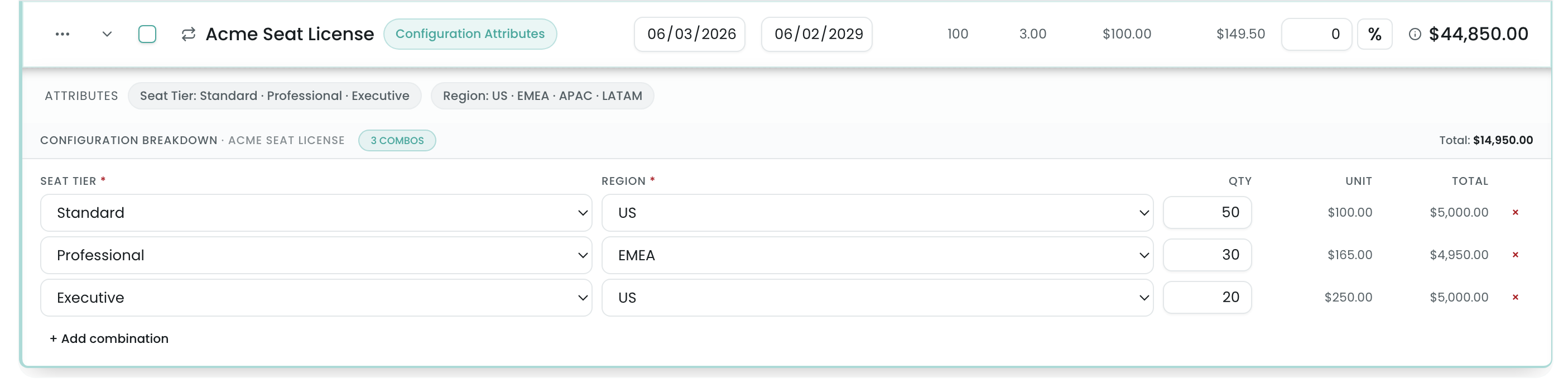
- Configuration attributes — products priced by a breakdown of attribute values (for example, a seat tier split across Standard / Professional / Executive), each with its own quantity and unit price that blend into the line.
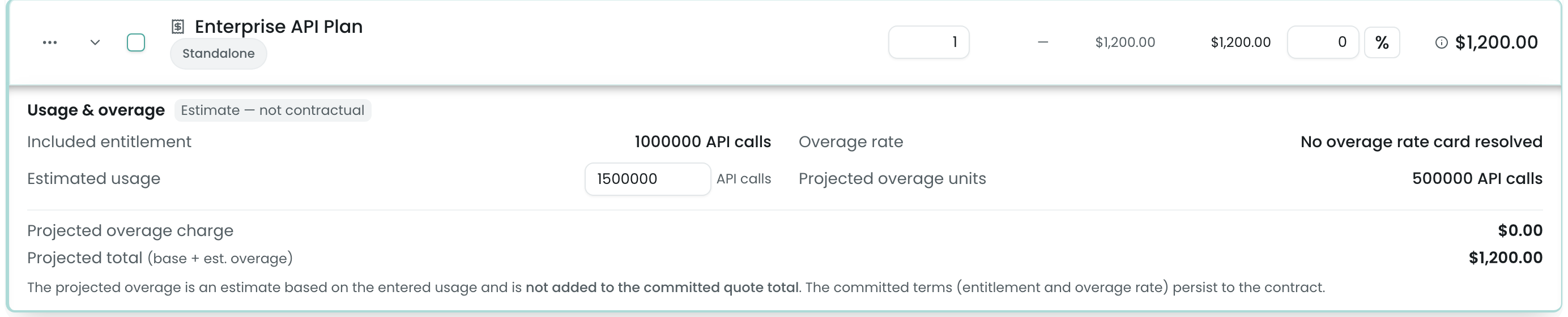
- Metered products — usage-based products that charge for consumption (API calls, GB, …) above an included entitlement. Adding one expands a Usage & overage panel where you enter estimated usage and read a projected overage; that projection is an estimate, not part of the committed total. See Quoting a Metered Deal.
- Favorites — products you (or your admin, globally) have starred surface first, so common kit is one click away.
The Price tab — set the numbers
The Price tab is the line editor. Lines are organized into groups (and bundle parents with their option children); each row carries the columns your admin configured — typically List, Unit, Add. Disc., Qty, Term, and Total — and the header sums the whole quote into Subtotal, Discount, and Total ACV.
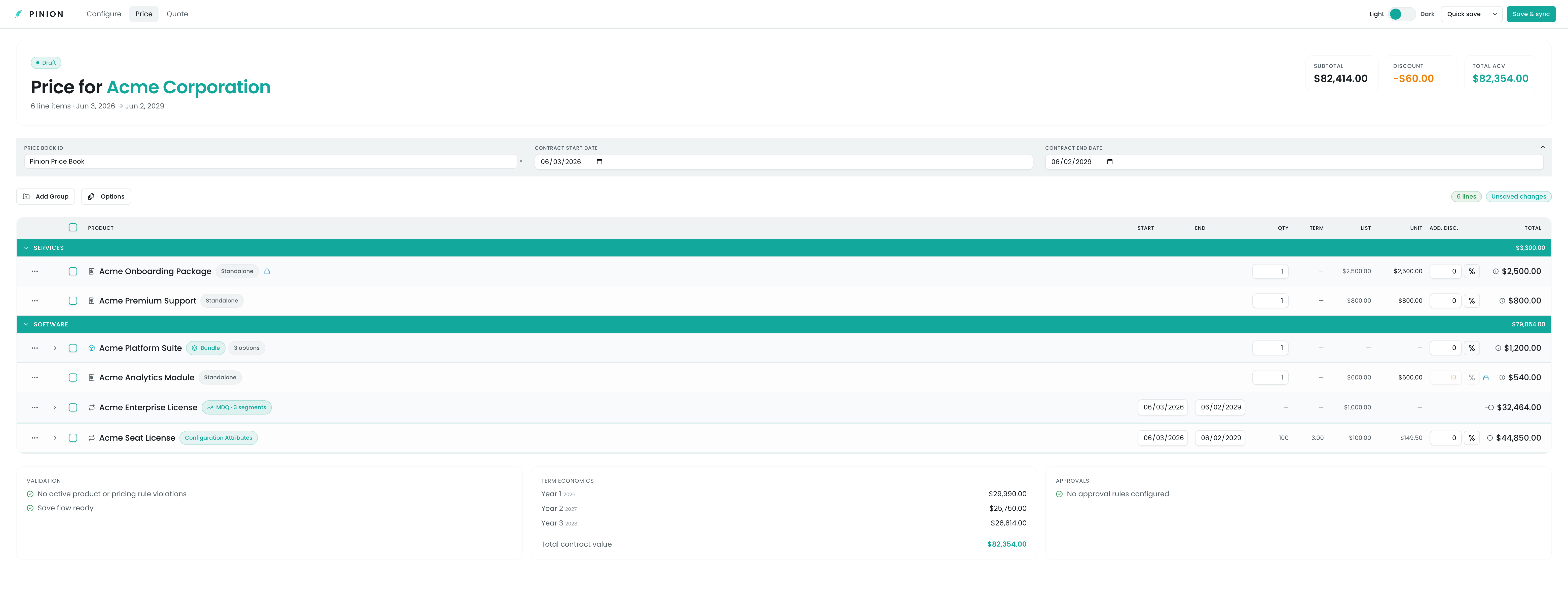
You edit a line in place:
- Quantity — type or step it; bundle-option and MDQ-segment quantities derive from their parent where the configuration says so.
- Unit price / Additional discount — override either directly. A manual override sticks (it won’t be silently overwritten by a default), unless a Pricing rule has locked the field — see Rule Transparency.
- Term — set start/end dates per line; for subscriptions these drive segmentation.
Expand a row’s chevron to open its detail:
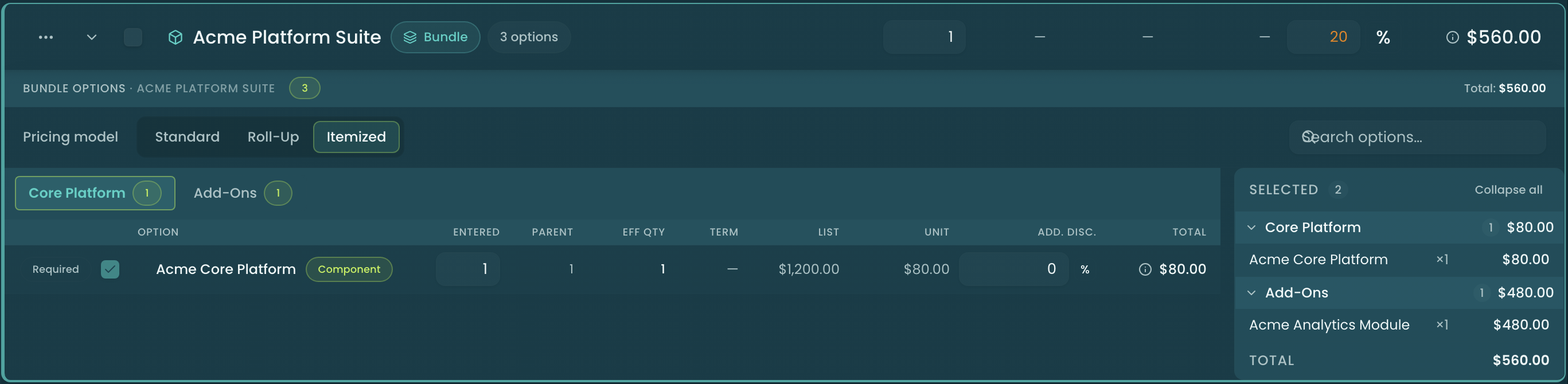
Bundle options. Opening a bundle brings up its options drawer: a Pricing model selector (Standard / Roll-Up / Itemized), a search box across all features, Feature tabs that group the options, and the option rows for the active feature — each showing its type (Component / Fixed / Accessory / Related), its quantity derivation, unit price, discount, and total. The four quantity cells read left to right as Entered × Parent × Term = Eff Qty: the quantity you typed, the bundle quantity it scales by (a dash for an Accessory, which does not scale with the bundle), the subscription term every option inherits from the bundle (a dash on a non-subscription bundle or a discount credit, which is term-exempt), and the resulting effective quantity that is saved on the line. An always-on Selected side panel lists everything you’ve turned on, grouped by feature, with a running bundle total.
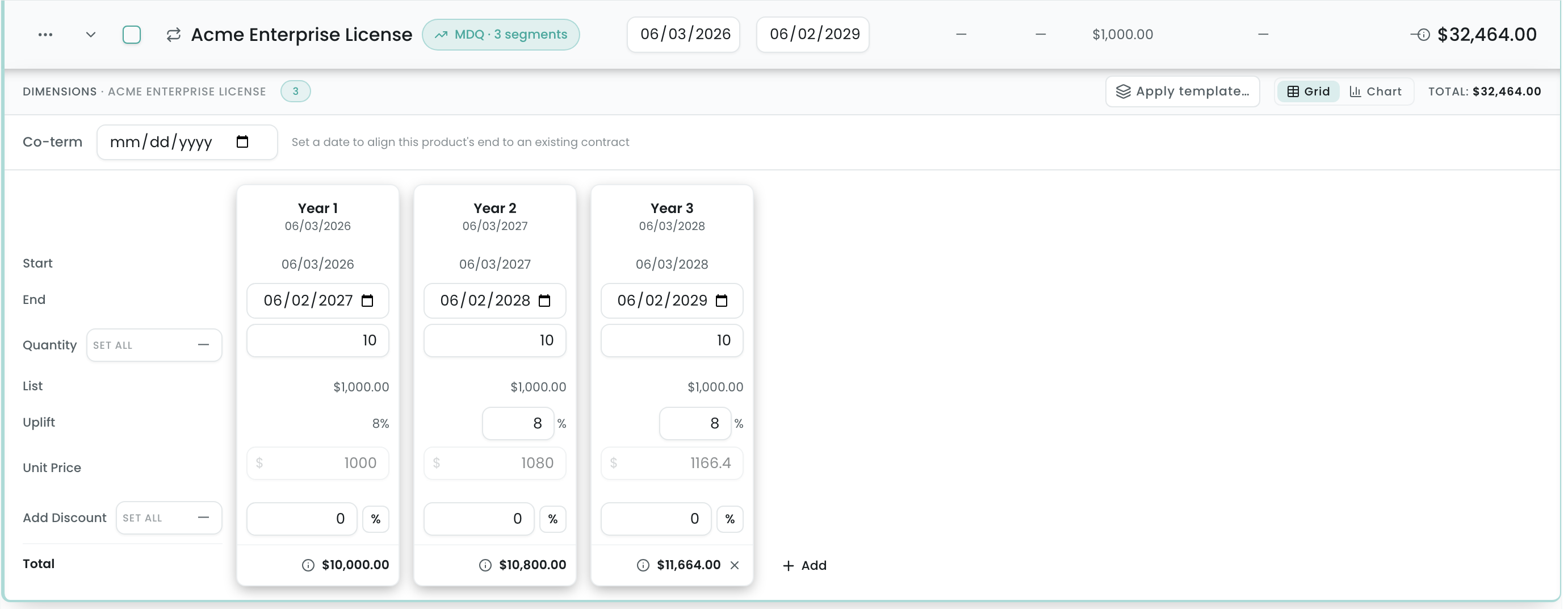
MDQ segments. Expanding a subscription opens the per-segment grid — one column per term, each with quantity, uplift, unit price, discount, dates, and a segment total — plus the Co-term field. Set a co-term date and the final segment truncates and prorates accordingly; a Grid/Chart toggle lets you read the ramp either way.
Metered lines. A usage-based line expands to its Usage & overage panel — the included entitlement, the resolved overage rate, an estimated-usage input, and a live projected overage and projected total. The projection is a sizing estimate; the committed line total stays the base subscription. On a multi-year MDQ metered line the overage rate can ramp per segment, and the panel shows the per-year breakdown. The full panel is documented in Quoting a Metered Deal.
Configuration attributes. Expanding an attribute-priced line opens its breakdown — each attribute value with its own quantity and unit price, blending into the line’s effective unit price and total.
The footer keeps three summary cards in view as you work: Validation (rule violations, or the green all-clear), Term Economics (per-year contract totals), and Approvals (which approval rules apply and their status).
Saving your work
The Configurator has two save actions, and the difference matters:
- Quick save — bookmarks the current configuration as a named snapshot without touching the line items. No line items are written, no approvals run, no changes to the Opportunity/Quote line items. Use it to park a what-if you might come back to. Quick save never overwrites the synced configuration: if the configuration you are editing is the one already synced to the deal, your edit is saved as a new draft option (the original name with (edited) appended) and becomes the selected option, while the synced one stays as it is until you Save & sync the draft. A Quick save with no changes saves nothing new.
- Save & sync — the real persistence. It writes the line items (Opportunity or Quote line items), the server recomputes pricing authoritatively, subscriptions are materialized on close-won, and any approval rules fire. The save is multi-pass and ordered so that line items are written first and the snapshot second — if the line-item write fails, nothing is half-saved. You’ll get a toast summarizing what changed (“Saved — N created, M updated, P deleted”), and an Unsaved changes badge reminds you when the grid has drifted from the last save.
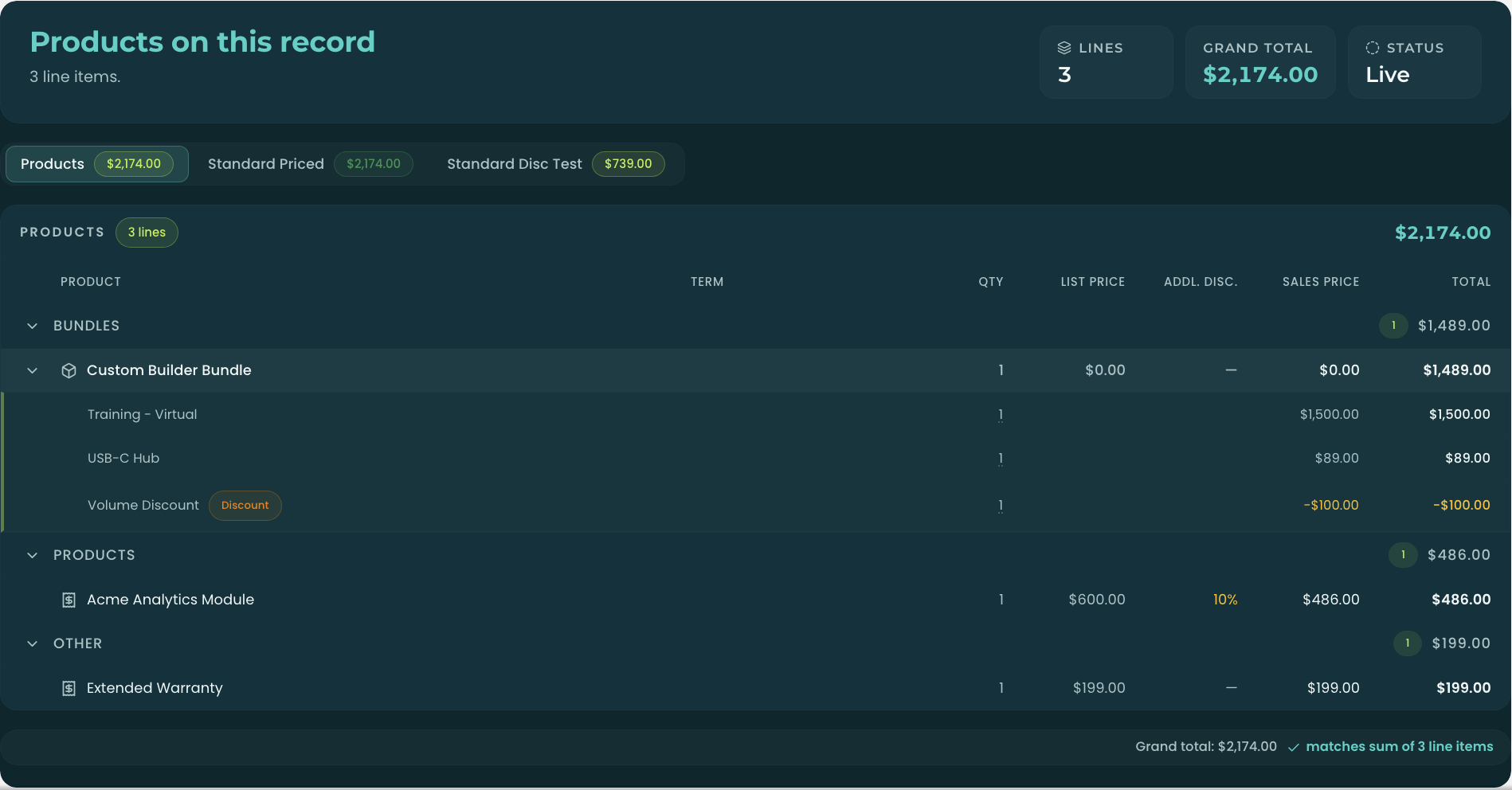
After a Save & sync, the persisted line items appear in Product Display — open it from the record’s Product Display panel (Open Product Display, which opens in a new tab on the current release) — and its grand total reconciles, to the cent, with the Configurator’s Total ACV and each bundle’s subtotal.
Related
- Overview & Launch — opening the Configurator and the three-tab workspace.
- Rule Transparency — the badges, locks, suggestions, hidden-product chip, and “Why this price?” breakdown you’ll see throughout.
- Bundles · Pricing Methods — the option model and how each price is computed.
- Quoting a Metered Deal — the Usage & overage panel for metered lines, including per-segment overage on MDQ.
- Block Pricing — fixed per-band prices and the Slab / Range aggregation mode that resolves a line’s quantity.
- Quoting — turning the saved configuration into a quote document (the Quote tab).