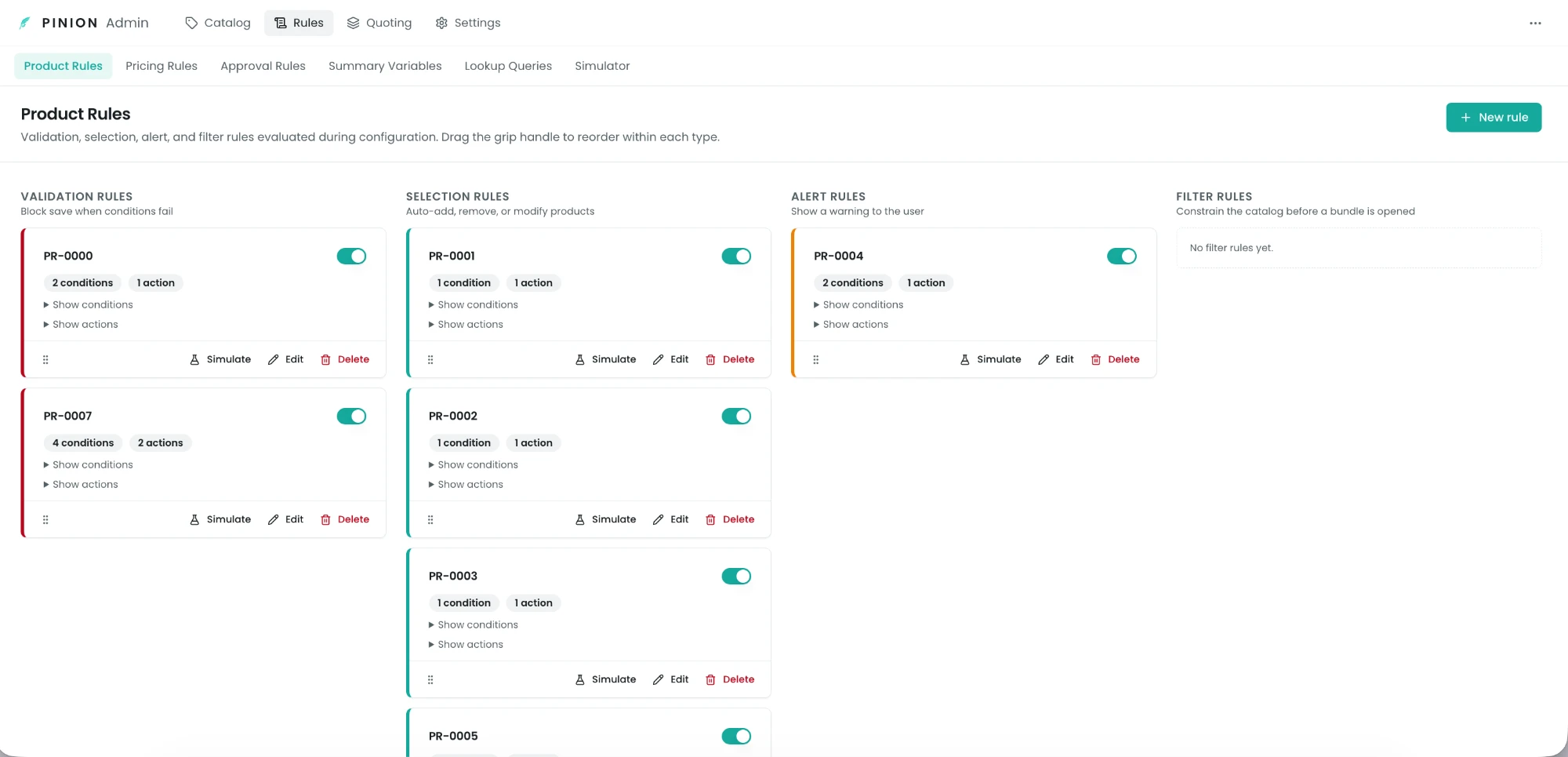
Product Rules
Product Rules let you move product-configuration logic — “these two SKUs can’t be sold together,” “adding the platform requires the onboarding package,” “warn if the term is under 12 months,” “only show enterprise products to enterprise deals” — out of spreadsheets and tribal knowledge and into an auditable engine. Reps experience rules as live, instant feedback while they build a quote: products get auto-added, locked, hidden, or flagged, with an on-screen explanation of why.
The four rule types
Every rule has a type that determines what it can do:
| Type | What it does | Typical use |
|---|---|---|
| Validation | Blocks the save with an error when its conditions are met | ”Can’t quote Product A without Product B” |
| Selection | Auto add/remove products, set fields, and show/hide/enable/disable rows | ”Adding the Platform auto-adds Onboarding (and locks it)“ |
| Alert | Shows a warning to the rep without blocking the save | ”Heads up: term is under 12 months” |
| Filter | Hides or shows products in the catalog browser, before a bundle is opened | ”Only show Government SKUs on Government deals” |
Anatomy of a rule
A rule is a set of conditions plus a set of actions: when the conditions are met (per the rule’s combine logic), the actions fire. You build one in a guided 4-step wizard — Basics → Conditions → Actions → Review (the New rule button, top-right of the Rules page).
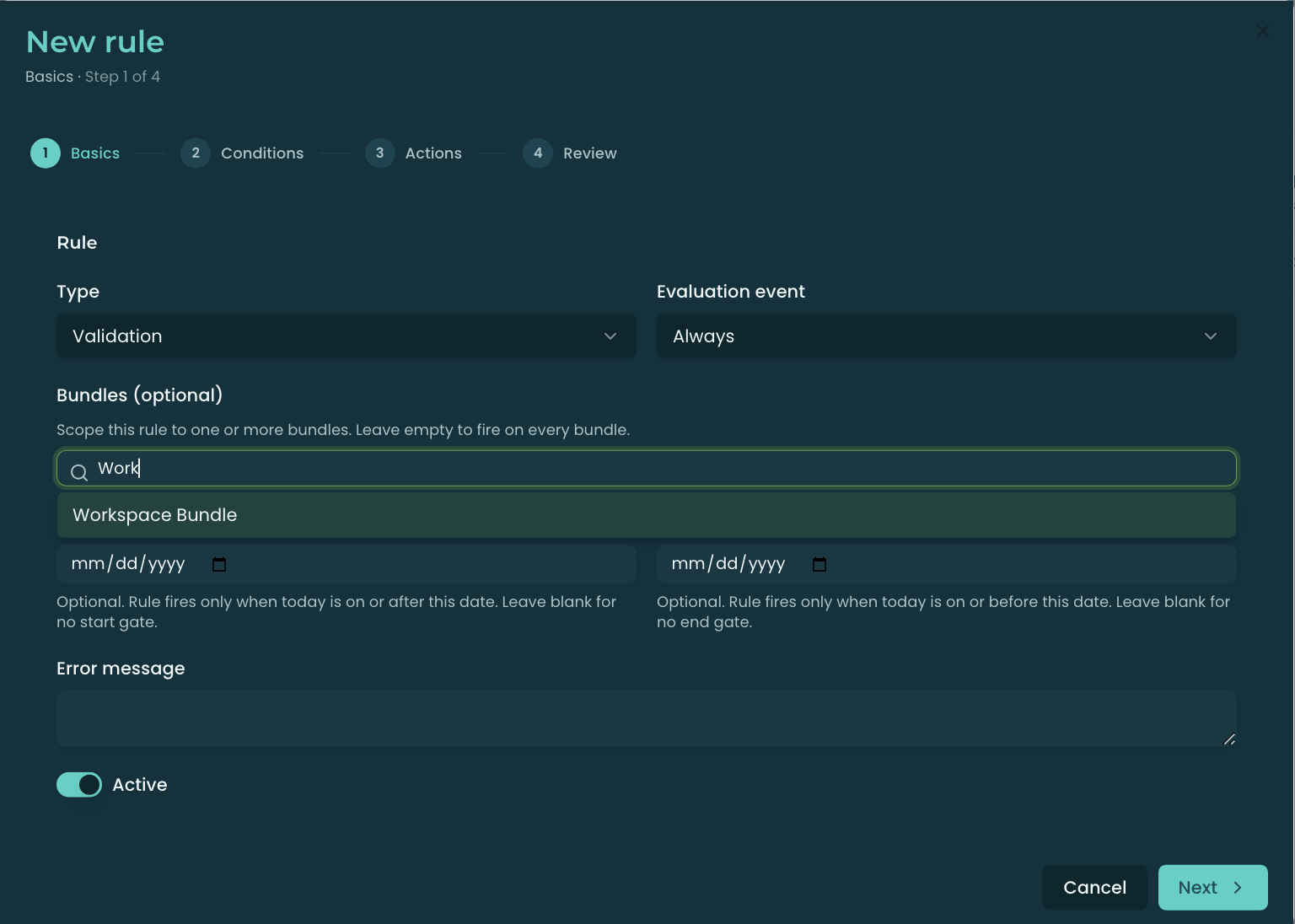
The Basics step carries:
- Type — Validation / Selection / Alert / Filter (above).
- Evaluation event — when the rule runs (see When rules run).
- Bundles (optional) — scope the rule to specific bundles; leave empty to fire on every bundle (see Scoping a rule to specific bundles).
- Effective dates (optional) — a start/end window; the rule fires only when today is within it (blank = no date gate).
- Error message (Validation) — the text shown when the rule blocks a save (defaults to the rule name).
- Active — only active rules evaluate; toggle on or off.
The rule’s name is auto-numbered (PR-0001). The condition combine logic (All / Any / Custom) lives on the Conditions step; evaluation order is set by drag-and-drop on the Rules page, not in the wizard.
Conditions
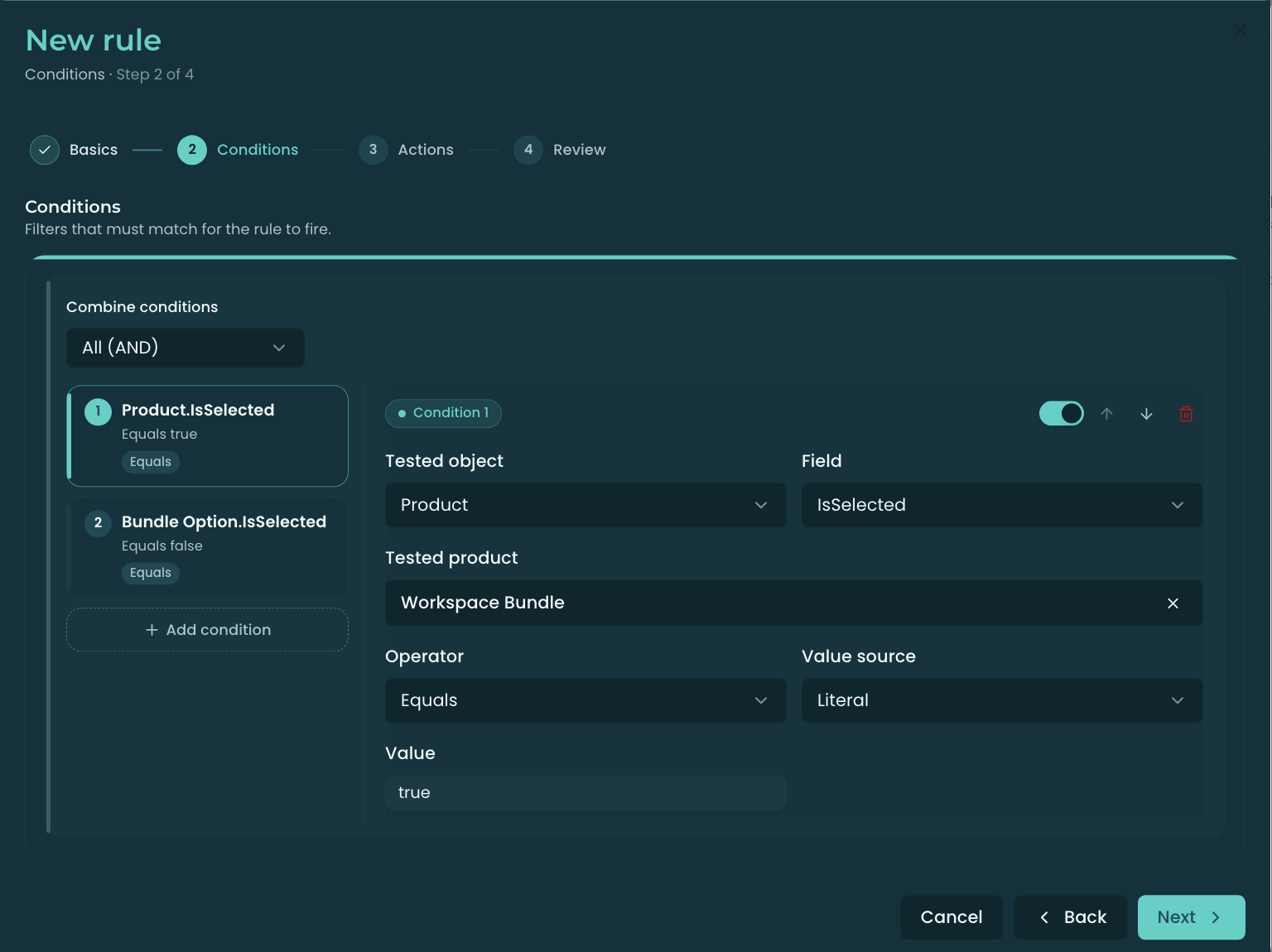
A condition tests a field and compares it to a value.
What you can test (Tested object):
- Product — a field on a top-level product line (e.g. Is Bundle). When the tested product is a multi-year MDQ line (more than one segment), a Quantity / Unit Price / Sales Price condition is checked against each segment — it fires when any segment matches, the same way a Dimension condition does. A rule like “Pro license requires quantity 5 or more” (Quantity > 0 and Quantity < 5) therefore stays quiet on a 5 / 8 / 5 ramp and fires as soon as one year drops to 3.
- Bundle Option — a field on a bundle’s child option (e.g. Quantity).
- Dimension — a field on an MDQ segment (Quantity, Unit Price, Start/End Date); fires when any segment of any selected MDQ product matches.
- Opportunity / Quote — a field on the parent record (e.g. Amount, Stage). (Quote is available in quote-line mode.)
- Summary Variable — a named aggregate across the quote’s lines (see Summary Variables).
Operators: equality (Equals, Not Equals), comparison (Greater/Less Than, …or Equal), string (Contains, Starts/Ends With), set membership (In, Not In — semicolon-separated values), date (Before, After, Within Days, Between), and null checks (Is Null, Is Not Null).
Value source — what the right-hand side means:
- Literal — a fixed value (
true,Premium,100). - Field reference — a live field on another record, e.g. Opportunity ▸ Contract End Date — so you can compare one field to another.
- Summary Variable — resolves a named aggregate at evaluation time.
Actions
Actions are what happens when the conditions fire. Available actions depend on the rule type:
- Cart changes (Selection): Add, Remove, Set Field (write a value to a field on the targeted line), Set Quantity.
- Visibility / interactivity (Selection / Validation / Alert): Show, Hide, Enable, Disable.
- Violations: Error (Validation — hard-blocks save), Warning (Alert — warns only).
Targeting — an action can target a specific Product, an entire product Group, or a Bundle Feature (hiding a feature drops its whole option set; Show always wins over Hide).
Required — a Selection rule’s auto-added (or auto-removed) row can be marked Required, which locks it so the rep can’t undo it. The configurator shows a lock badge so the rep knows it’s rule-driven.
Usage terms. On a metered product, Set Field can also write Usage Entitlement, Overage Rate, and Estimated Usage — so entitlement and overage can follow policy (“Enterprise accounts get 10,000,000 included calls”) instead of being hand-entered. A rule-written usage term outranks both the usage dimension’s definition value and a rep override, and applies even when the term isn’t marked editable. A rule-set overage rate is used exactly as written, including on every segment of a multi-year line. Sub-cent rates such as $0.001 are preserved. See Usage & Metered Billing.
When rules run
Two things govern when a rule takes effect:
Evaluation event (per rule):
- Always — on load and on every edit (live).
- Load — once, when the configurator opens.
- Edit — whenever the rep changes a selection or field.
- Save — only during final save validation.
Scoping — two mechanisms keep a rule from running where it shouldn’t:
- Bundle scope (you control this — see below) — restrict a rule to specific bundles.
- Product-context scope (automatic) — a product-specific rule is skipped when none of the products it references are in the current catalog/cart; global rules always load.
Scoping a rule to specific bundles
By default a rule is global — it’s evaluated for every configuration. To restrict it, use the Bundles (optional) picker on the wizard’s Basics step (“Scope this rule to one or more bundles. Leave empty to fire on every bundle.”): search and select one or more bundles, and the rule then fires only when one of those bundles is in the configuration. Leave the picker empty to keep the rule global.
Use this whenever a rule only makes sense inside a particular bundle — e.g. “inside the Platform bundle, choosing the Premium add-on requires the Support option.” Scoping it to that bundle keeps it from evaluating (or mis-firing) on unrelated quotes, and keeps the engine fast.
- The selected bundles show on the rule’s card, and the Simulate button defaults to a scoped bundle so you can test the rule in its real context.
- Scope is stored as
RuleBundleScope__crecords linking the rule to each bundle. - The same Bundle Scope picker and behavior apply to Pricing Rules.
What the rep sees
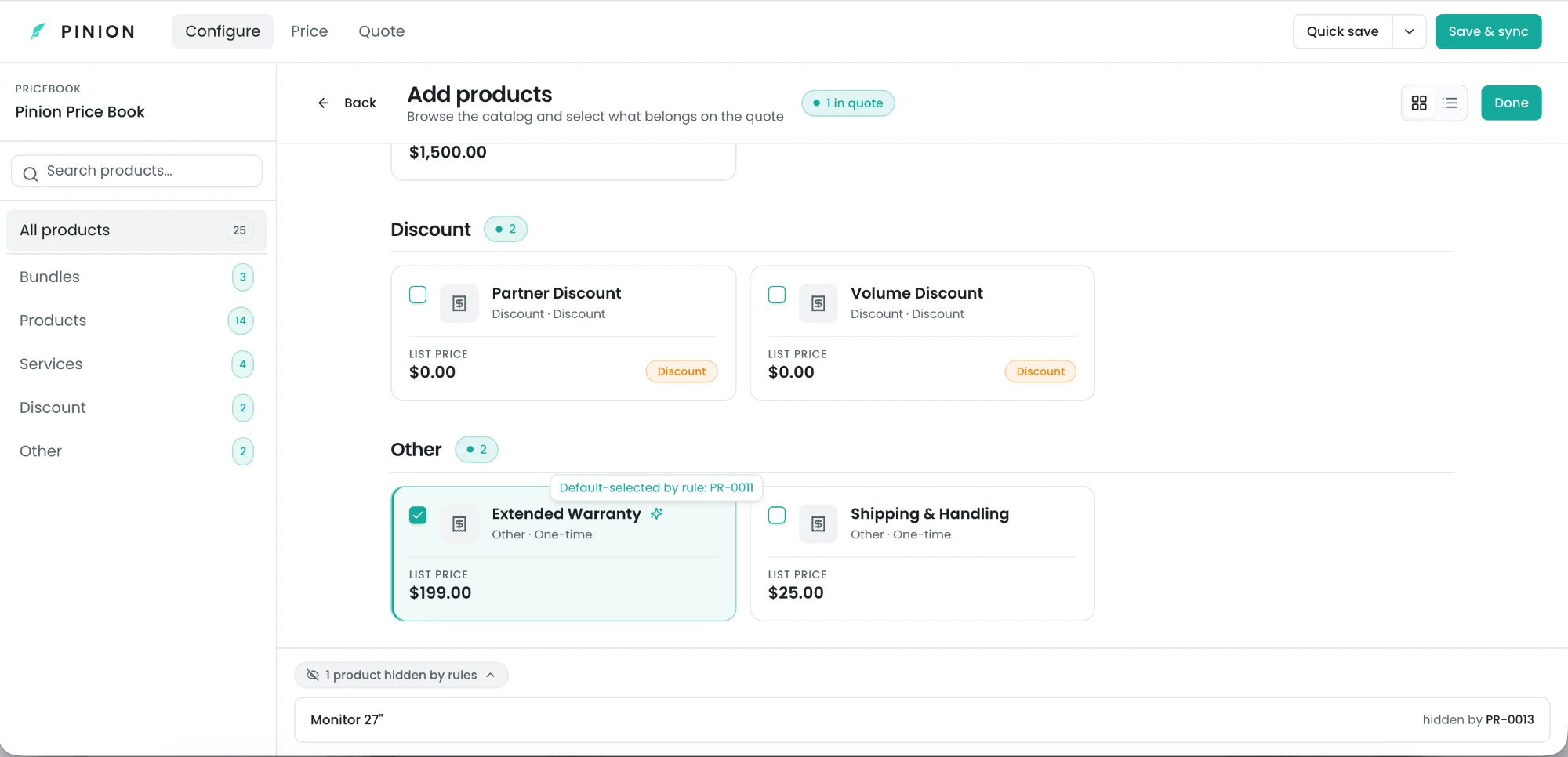
Rules are transparent by design — the rep is never left guessing why the cart changed:
- Violation badges — a red icon (Validation error) or amber icon (Alert) on the affected row, with the message on hover.
- Lock badges — a lock (a required product the rule auto-added) or a “no” icon (a row the rule disabled); the checkbox is non-interactive.
- “N hidden by rules” chip — a summary at the bottom of the Configure tab; expand it to see each hidden product and the rule that hid it.
- Default-selected indicator — a sparkle on a product a Load-event rule auto-selected.
At save, Validation rules re-run on the server — so a blocked configuration can’t be saved even outside the UI.
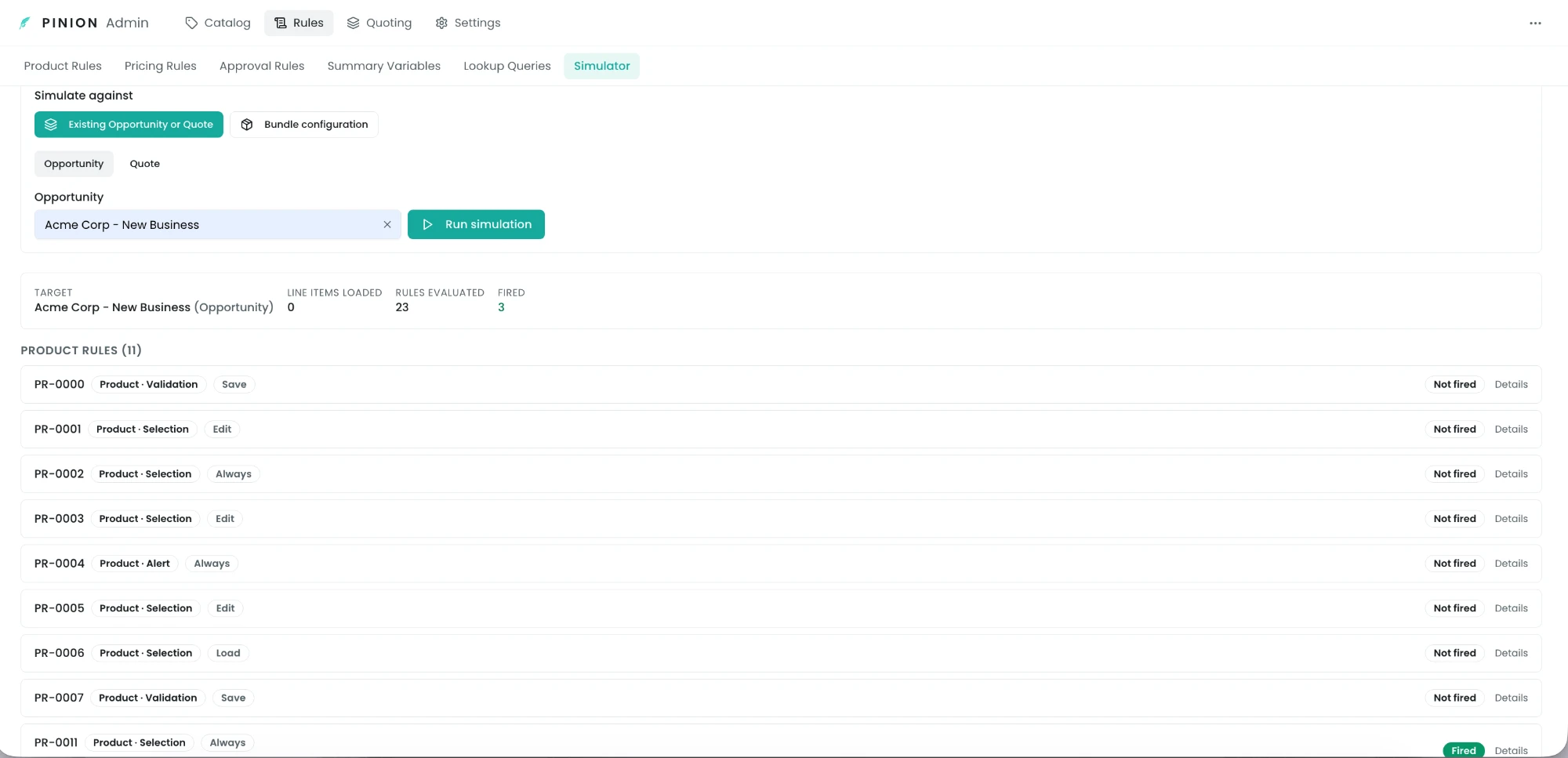
Testing rules with the Simulator
Before activating a rule on live quotes, test it in the Rule Simulator (under Rules). It evaluates rules with zero database changes against either:
- an existing Opportunity or Quote (loads its real lines), or
- a virtual bundle configuration you toggle options on (the right way to test Selection rules, which act on the cart, not on saved lines).
Each rule shows Fired / Not fired / Out of scope, plus a condition-by-condition breakdown (tested value, comparison value, pass/fail) — so you can see exactly why a rule did or didn’t fire.
Limits & gotchas
- Cascade cap. Selection rules can trigger other rules (an auto-add satisfies another rule’s condition, etc.). The engine loops until it settles, capped at 50 passes. Real rule sets settle in a handful; hitting the cap usually means a circular rule — the save is blocked with a clear error so you can find and fix the cycle.
- Filter rules are UI-only — see the warning above; they are not access control.
- Conditions with no value on a non-null operator are skipped defensively (e.g. Equals (blank) won’t fire).
- A rule with zero conditions never fires — add at least one condition.
- On/off switch. Admins can disable the whole engine (or just server-side enforcement, or just scoping) via Configurator Settings — see Administration ▸ Settings. Rules ship on in a real org.
Related
- Pricing Rules — same condition→action model, applied to price fields.
- Approval Rules — condition-driven approval workflows.
- Summary Variables · Lookup Queries — reusable inputs for rule conditions and actions.
- Rule Simulator — full reference for what-if testing.