Bundle Options
An option is a child product inside a bundle. You add and edit options on the Bundling tab in Product Manager. Each option pairs a product with the rules that govern how it behaves in the configurator and how it prices.
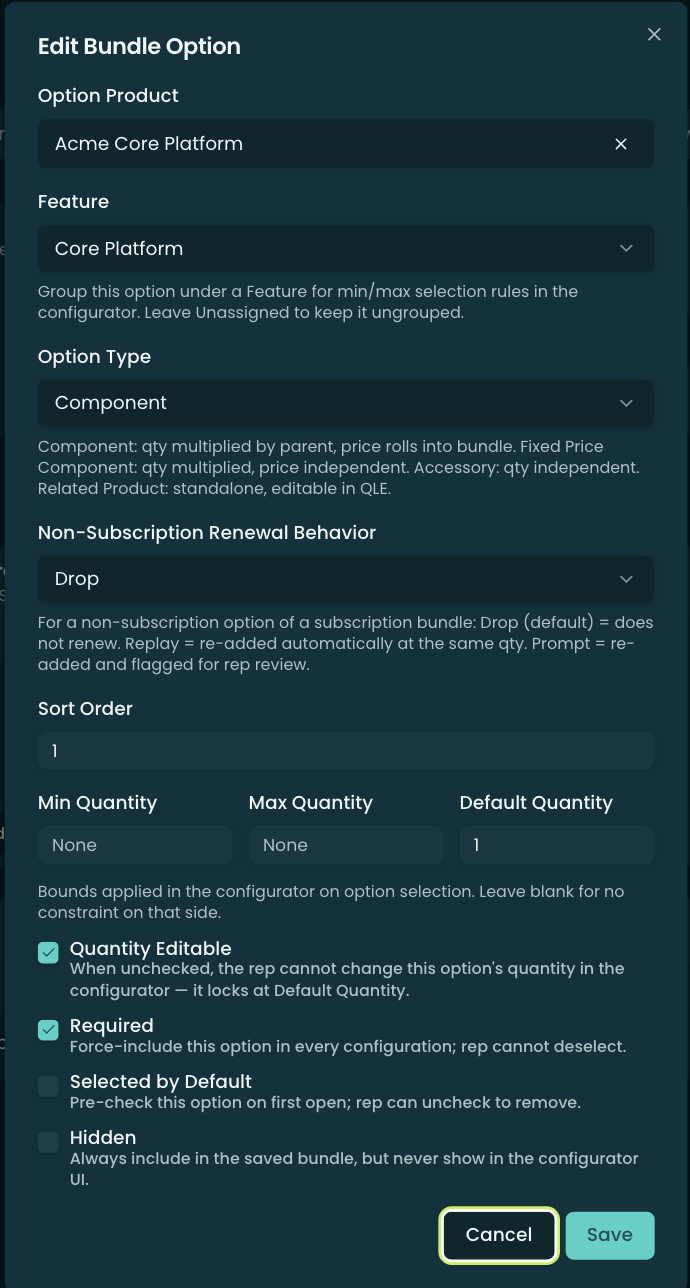
Option Type — the most important choice
The Option Type decides how the option’s quantity and price relate to the parent. There are four:
- Component — quantity is multiplied by the parent’s quantity, and the price rolls into the bundle. (10 bundles × a 2-per-bundle component = 20.) This is the “part of the product” option.
- Fixed Price Component — quantity is multiplied by the parent, but the price is independent of the bundle’s pricing model.
- Accessory — quantity is independent of the parent (it does not scale when the bundle quantity changes). An add-on you buy a fixed number of.
- Related Product — a standalone line, editable in the QLE — loosely associated, priced on its own.

Quantity controls
- Min Quantity / Max Quantity — bounds enforced in the configurator when the option is selected (blank = no bound on that side).
- Default Quantity — the quantity the option starts at (defaults to 1). It applies the moment the option is on, whether the rep ticked it or it came on by itself via Required, Selected by Default, or Hidden. The seeded quantity is the one that gets saved, so a bundle can be saved straight from its default state without the rep touching the quantity field. If the option was already saved on this line, the quantity the rep last entered wins over the default, so reopening a configuration never resets it.
- Quantity Editable — when off, the rep can’t change the option’s quantity; it locks at Default Quantity.
(The save validates Min ≤ Max and that Default falls within the Min/Max range.)
Selection flags
- Required — force-include this option in every configuration; the rep cannot deselect it.
- Selected by Default — pre-checked on first open, but the rep can uncheck to remove it.
- Hidden — always included in the saved bundle, but never shown in the configurator UI.
Feature, sort order, and renewal
- Feature — assign the option to a Feature so it participates in that feature’s min/max selection rules; leave Unassigned to keep it standalone.
- Sort Order — position among the options (blank = automatic / alphabetical).
- Non-Subscription Renewal Behavior — for a non-subscription option on a subscription bundle, what happens at renewal: Drop (default — doesn’t renew), Replay (re-added automatically at the same quantity), or Prompt (re-added and flagged for the rep to review). A Required option is always carried at renewal regardless of this setting — the bundle can’t be saved without it — and is flagged for review like a Prompt option.
Configurable Children (sub-bundles)
When the option is itself a bundle (a sub-bundle), a Configurable Children flag appears. Turn it on to enable pricing on the sub-bundle’s own options; those prices roll up to the parent. See Overview — Sub-bundles.
Related
- Pricing Models — how each option type’s price presents and rolls up.
- Features — grouping options with selection rules.
- Constraints — dependencies/exclusions between options.
- Overview — the bundle as a whole.