Catalog & Pricing Setup
Before a rep ever opens the Configurator, an admin decides what’s in the catalog and how it’s priced. That setup is what this section covers. Get it right once and every quote downstream — pricing methods, bundles, approvals, renewals — builds on it.
The work splits across two admin homes, by scope:
- The Pinion admin app — the dedicated admin workspace, for the org-wide building blocks that aren’t tied to a single product: Product Groups, Discount Schedules, Segment Templates, and Pricing Waterfalls.
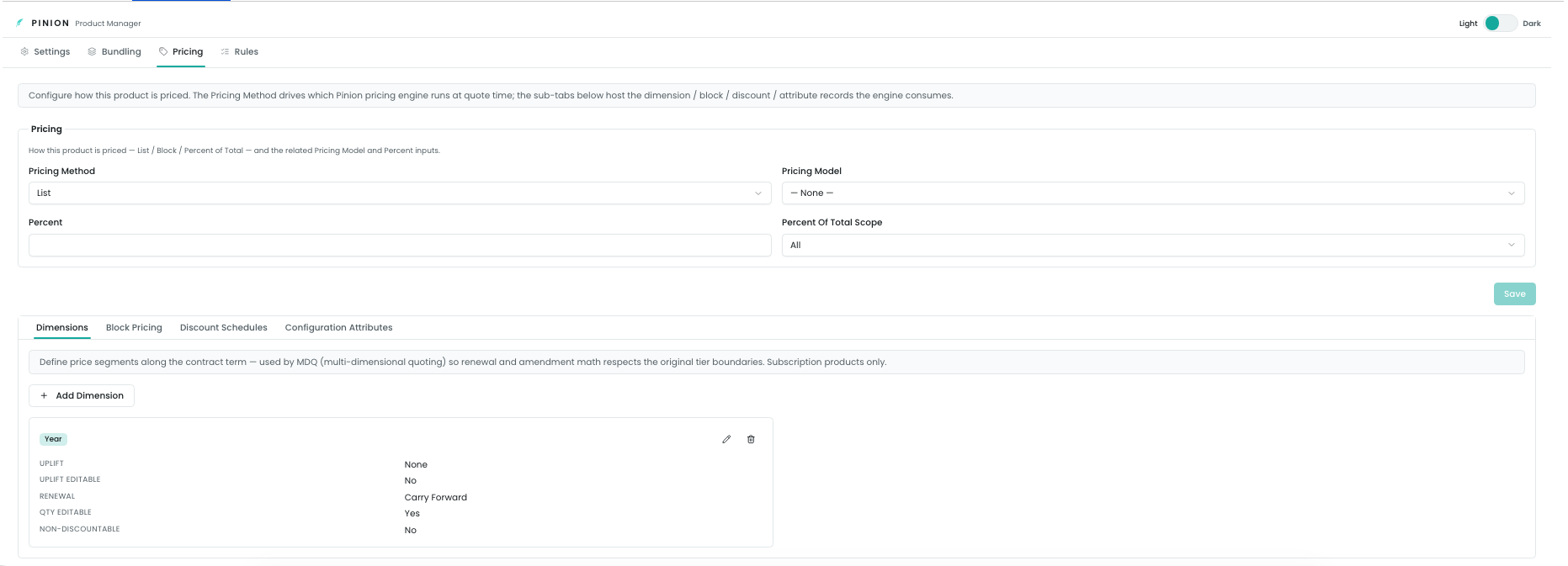
- Product Manager — opened on an individual Product record (the Pricing tab), for the pieces that belong to that product: Configuration Attributes, Dimensions, and Block Pricing.
What you configure in the Pinion admin app
These are reusable, org-wide definitions. You author them once and reference them from many products.
- Product Groups — how products are organized into groups in the catalog, and which groups are visible to reps. You pick the Product field that defines the grouping and toggle visibility per group. Visibility is org-wide; admins always see every group, reps see only the ones you’ve enabled.
- Discount Schedules — reusable volume/term discount tiers. Each schedule is Slab (one matching tier applies) or Range (matching tiers stack), with a discount in percent or amount, aggregated at line, group, or quote scope. Tiers define the bounds; an optional date range gates the schedule.
- Segment Templates — reusable ramp shapes for multi-year (MDQ) deals: a per-segment pattern of quantity multiplier, uplift, and discount. A template is matched to a product by dimension type and segment count, so reps can apply a consistent ramp in one click.
- Pricing Waterfalls — the configurable order in which a price is built: list/base, block, contracted price, volume/term discounts, floors, promos, and so on. The seeded Default reproduces Pinion’s standard pricing order and is locked; you clone it to customize — reorder steps, enable/disable them, and assign a waterfall to a deal.
What you configure in Product Manager (per product)
Open Product Manager on a Product record and go to the Pricing tab. These pieces live on that specific product.
- Configuration Attributes — the attributes a rep sets when configuring this product (text, number, date, picklist, toggle), with optional validation and per-value price for config-attribute pricing. Attributes can be global (shared across products) and dimensionally variable (set per segment).
- Dimensions — for subscription products, the time dimensions that drive multi-year / MDQ pricing: Year, Month, Quarter, Custom, or a One-Time dimension. Time dimensions carry uplift, per-segment editability, renewal behavior, and discount aggregation; One-Time dimensions carry a unit price only.
- Block Pricing — quantity-band fixed unit prices (e.g. 1–10 at one price, 11–50 at another), specific to a price book, with optional effective dates and conditions.

How it feeds pricing
Everything here is the input to the pricing engine. When a rep prices a line, Pinion runs the pricing waterfall — and the steps in that waterfall draw on exactly the things you set up in this section: the product’s list/block price, the discount schedules that apply, the segment ramp, the contracted price, and so on. The Pricing Methods section documents what each step does with these inputs; this section is about getting the inputs in place.
Related
- Pricing Methods — how List, Block, MDQ, discounts, contracted price, promos, and Percent-of-Total actually compute, and the waterfall flow that sequences them.
- Bundles — composing products into bundles with options, constraints, and bundle pricing.
- Configurator — where the rep consumes all of this to build a quote.