Bundles
A bundle is a parent product that carries options — other products a rep includes or excludes when configuring the deal. “Configure a laptop bundle: pick a warranty, add accessories, choose a support tier” — that’s a bundle with options, features, and constraints. You author all of it in Product Manager, and the rep assembles it in the configurator.
Making a product a bundle
Open a Product in Product Manager and go to the Bundling tab (it’s always available). The Bundle Configuration form has the product-level switches:
- Bundle — marks this product as a bundle. (Setting it reveals the empty-state guidance and lets you start adding Features and Options.)
- Pre-populate all options — when on, the bundle pre-selects and locks every un-Featured option at launch (a fixed, “defined” bundle); when off, the rep picks which options to include (a “custom” bundle). Options that belong to a Feature are governed by that feature’s selection rules instead.
The bundle’s Pricing Model (Standard / Roll-Up / Itemized) is set in this same Bundle Configuration form — see Pricing Models.
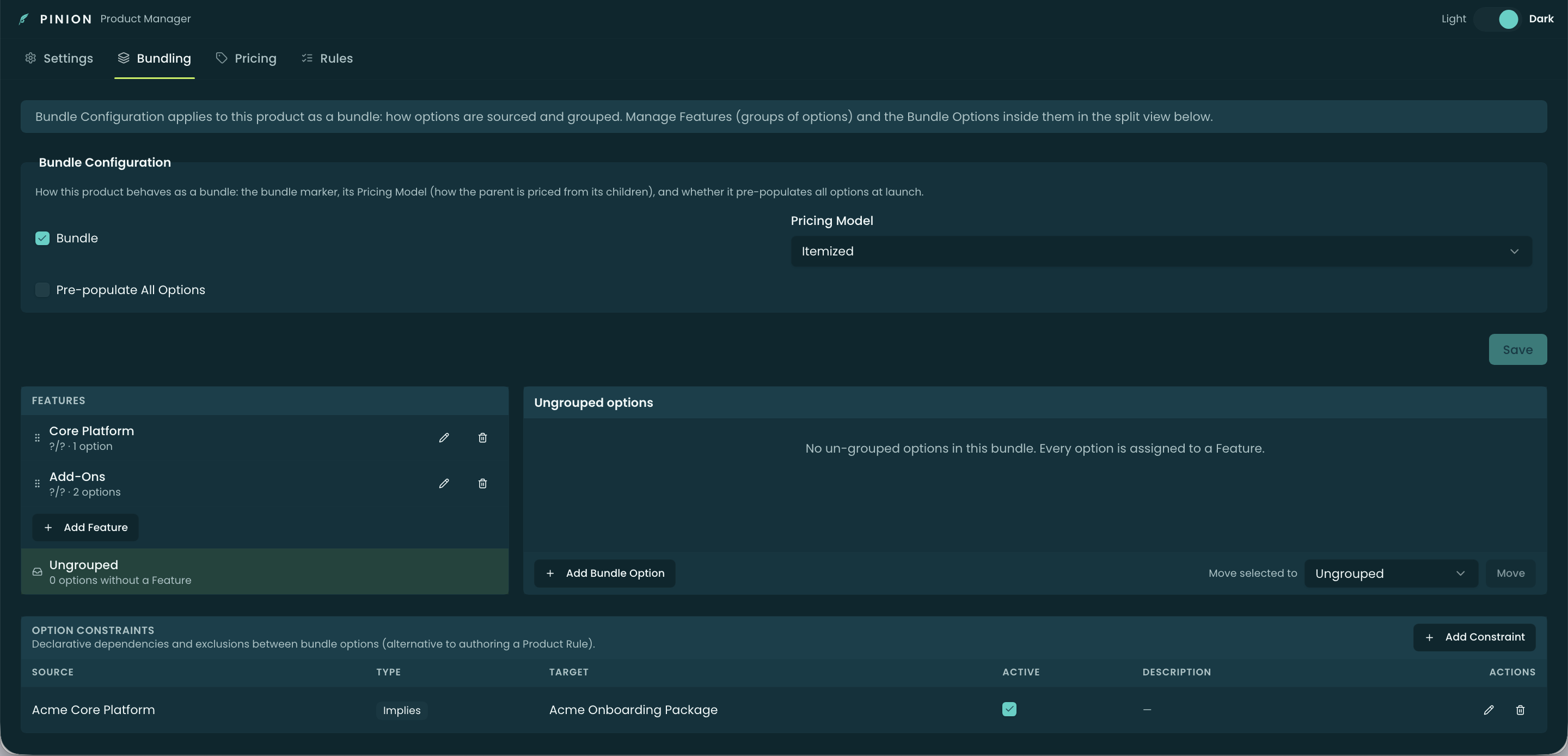
The three building blocks
A bundle is assembled from three things, all on the Bundling tab:
- Options — the child products in the bundle. Each option has a type (Component, Fixed Price Component, Accessory, or Related Product) that decides how its quantity and price relate to the parent, plus per-option flags (Required, Selected by Default, Hidden) and quantity bounds.
- Features — groups of options with min/max selection rules (e.g. “pick 1–3 add-ons”) and a selection method (Click, Add, or a Dynamic SOQL-filtered set).
- Constraints — declarative dependencies and exclusions between two options (Requires, Excludes, Implies) — a lighter-weight alternative to authoring a Product Rule.
Pricing models, at a glance
A bundle’s Pricing Model decides how option prices present and roll into the parent (set on the Pricing tab as a multi-select):
- Standard — a single bundle price on the parent.
- Roll-Up — each option keeps its own price; they roll up into the parent’s total.
- Itemized — each option shows its own price and the parent sits at $0.
Select more than one and the configurator shows a toggle so the rep can switch models on the deal. Full detail in Pricing Models.
Sub-bundles (nesting)
An option can itself be a bundle. When you add a bundle as an option, it becomes a sub-bundle; enabling Configurable Children on that option turns on pricing for the sub-bundle’s own options, and those prices roll up to the parent. This lets you compose larger offerings out of smaller ones.
Where reps use it
Everything you author here surfaces in the configurator: the rep adds the bundle, expands it, and turns options on/off within your features and constraints. See Configurator — Building a Quote for the rep-facing walkthrough.
Related
- Options · Features · Constraints · Pricing Models
- Configurator — Building a Quote — assembling a bundle on a deal.
- Pricing Methods — where bundle pricing sits in the waterfall.