Lookup Queries
A Lookup Query turns a data table into a value a rule can use. Instead of hard-coding “$50/seat” into a rule, you point the rule at a lookup that returns the right number by matching the deal’s context against a table — a rate card keyed by region and tier, a shipping table keyed by weight band, a discount floor keyed by industry. The rule’s action then sets the price (or field) to whatever the lookup returns.
Define a lookup on the Lookup Queries tab, then select it as the Lookup value source in a Pricing Rule or Product Rule action.
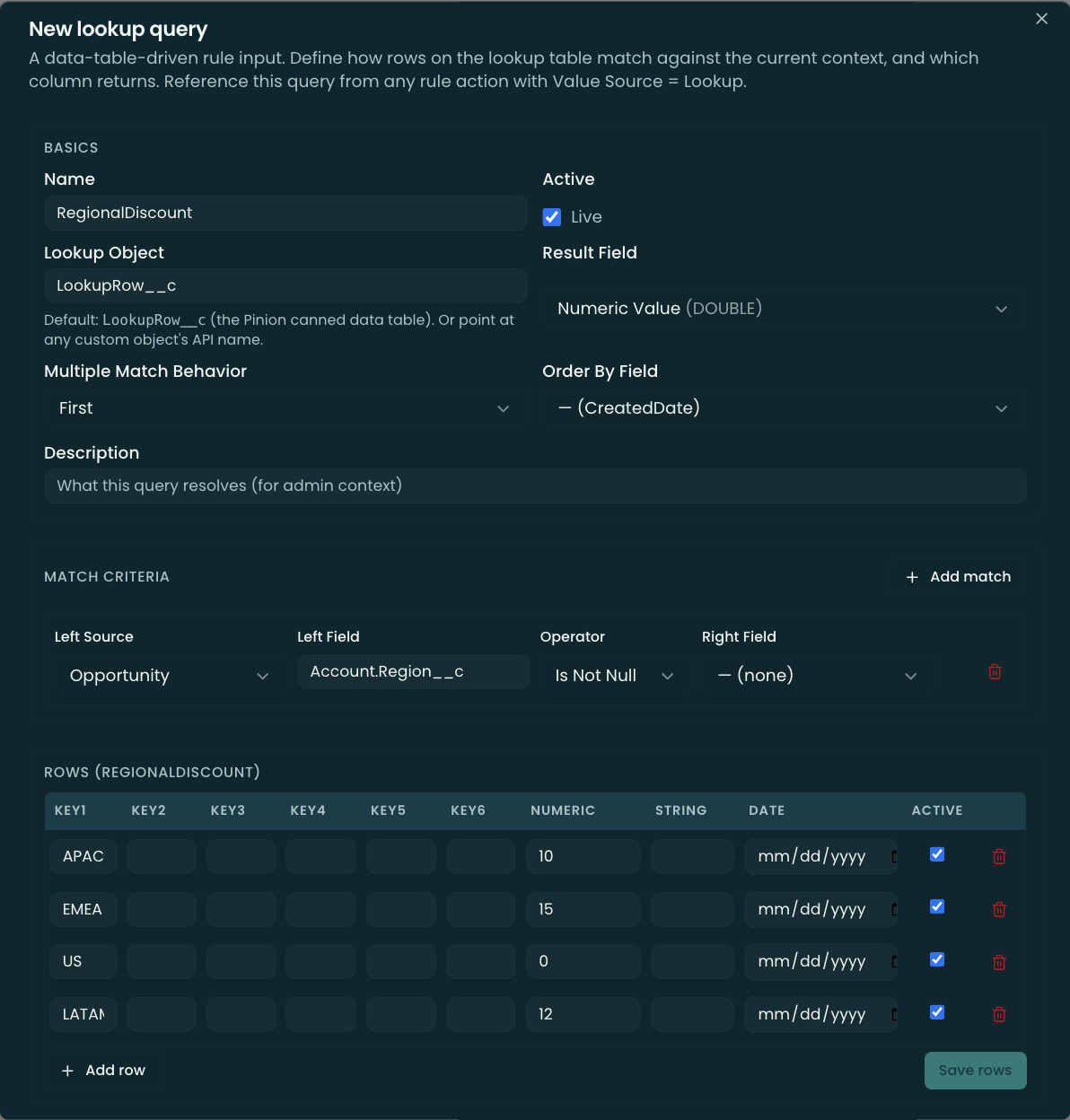
How a Lookup Query is built
Three pieces:
1. The query header (LookupQuery__c)
- Name — the identifier rules reference (also partitions the default data table).
- Lookup object — the table to read. Defaults to the built-in Lookup Rows table; advanced users can point at any custom object.
- Result field — the field whose value is returned (on the built-in table, a Numeric / String / Date value column).
- Multiple-match behavior — when more than one row matches: First, Last (by an order-by field), Sum (numeric), or Error.
2. Match criteria (one or more rows) — each is one filter:
- Left source — where the input comes from: Product, Option, Opportunity, Quote, Summary Variable, or Literal.
- Left field + Operator + Right field (the table column to match against, e.g. a key column).
- All criteria are AND-combined — every active criterion must match.
3. The data — on the built-in Lookup Rows table, each row has up to six key columns (the values your criteria match against) plus the value columns the Result field reads. The tab includes a spreadsheet editor for entering rows.
Using one in a rule action
In a Pricing- or Product-rule action, set the value source to Lookup and pick the query. When the rule fires, the lookup resolves against the deal context and the resolved value drives the action (e.g. Set Sales Price = the rate-card value). If nothing matches, the lookup returns nothing and the action falls back to its default.
Limits & gotchas
- Server-side only — not evaluated in the configurator’s live preview; resolves at save.
- AND-only — all match criteria must pass; there’s no OR / custom-logic expression (unlike rule conditions).
- Multiple matches — if several rows match and the behavior is Error, tighten the criteria or set an order-by field to disambiguate (First/Last) — or use Sum.
- Data partitioning — rows in the built-in table are scoped to their query by name; the editor sets this for you.
Related
- Pricing Rules · Product Rules — select a Lookup Query as the Lookup value source in an action.
- Summary Variables — can serve as a match input (Left source = Summary Variable).