Summary Variables
A Summary Variable is a named number computed across the lines of a configuration — a count, a sum, a min/max/average — that any rule can test in its conditions. Where a normal condition tests one field on one line (“this product’s quantity > 5”), a Summary Variable lets a rule test the whole cart: “total seats across all products ≥ 100”, “more than 3 add-ons selected”, “the largest line discount exceeds 30%”.
Define it once on the Summary Variables tab, then reference it by Name from a Product Rule, Pricing Rule, or Approval Rule condition.
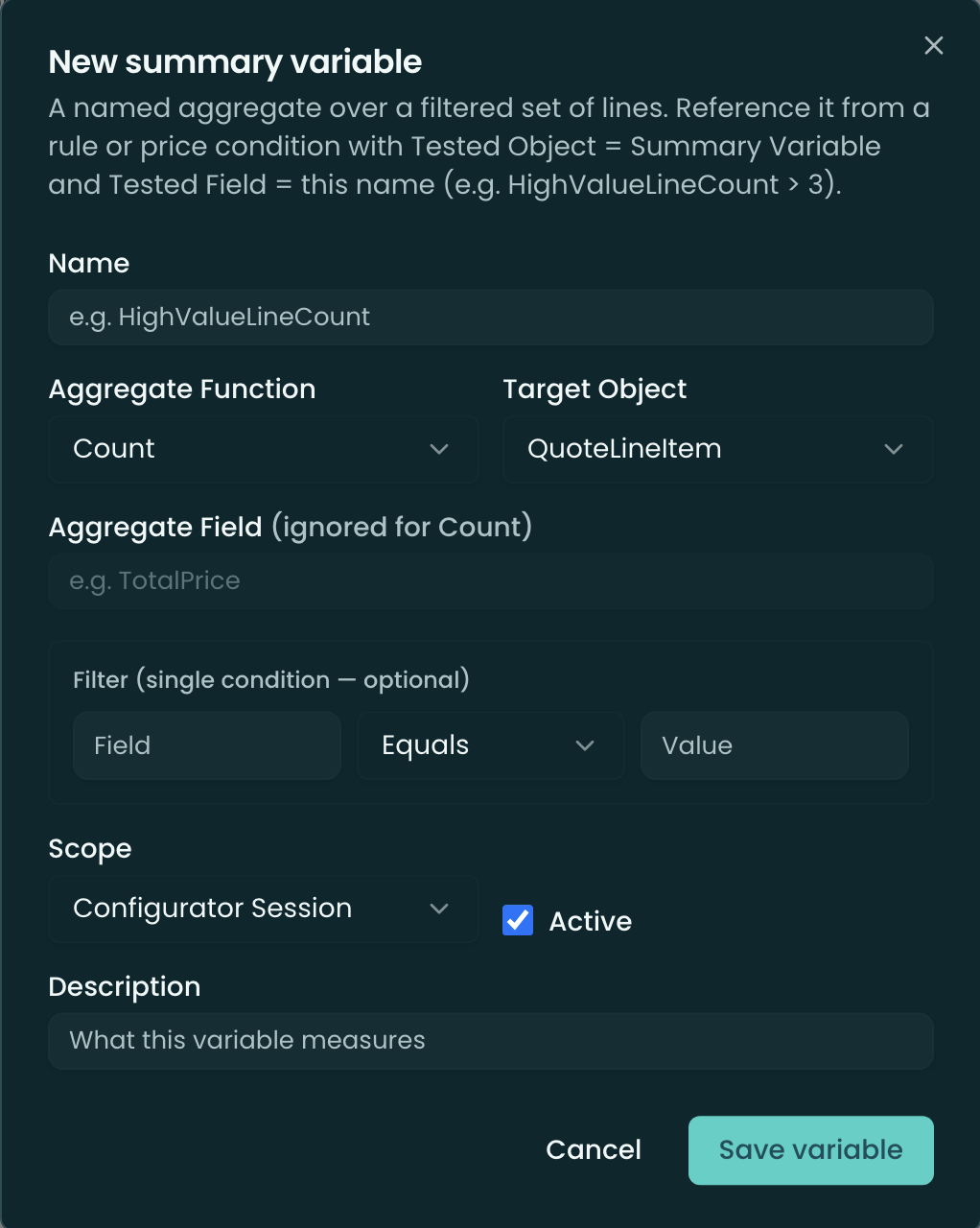
How a Summary Variable is defined
| Field | What it does |
|---|---|
| Name | The identifier rules reference. (Conditions store the Name, not an Id — see the rename gotcha below.) |
| Aggregate function | Count (number of matching lines), Sum, Min, Max, Avg, or First / Last (the raw value of the first/last matching line). |
| Aggregate field | The line field to aggregate (e.g. Quantity, TotalPrice). Required for everything except Count. |
| Target object | Which line object to run over — OpportunityLineItem, QuoteLineItem, or Subscription — must match the configurator’s target object. |
| Scope | Configurator Session (the lines being configured right now, including unsaved edits) or All Lines (lines already persisted on the parent record). |
| Filter (optional) | A single condition — Filter field + operator + value — limiting which lines the aggregate includes. Leave blank to include every line. |
| Active | Inactive variables are hidden from the rule condition pickers and don’t evaluate. |
Using one in a rule condition
In any rule’s condition builder, set the Tested object to Summary Variable and pick the variable by name; choose an operator and a comparison value. The same builder and the same evaluation apply across Product, Pricing, and Approval rules — see Product Rules ▸ Conditions.
Summary Variables evaluate both in the configurator (live, as the rep builds the quote) and on the server (at save and in the Rule Simulator) — the two engines are kept in parity.
Limits & gotchas
- Single-condition filter only — you can filter the aggregated lines by one field/operator/value, not a multi-condition expression.
- Field API names — the Aggregate field and Filter field take the exact field API name.
- Renaming breaks references — rules reference the variable by Name, so renaming it orphans every condition that used the old name. Rename deliberately.
- Target object must match — a variable’s Target object has to match the configurator’s target (OLI vs QLI) to resolve.
Related
- Product Rules · Pricing Rules · Approval Rules — reference a Summary Variable from any rule’s conditions.
- Rule Simulator — shows each variable’s resolved value when you test a rule.