Map & promote workbench
The Map & promote workbench is the precise, record-by-record way to promote configuration. You pick a target org and a parent object, see that object’s records in your org and the target org side by side, map each one by hand, review exactly what will change, and promote just the records you want. It’s the primary Config Promotion surface — open it from the Map & promote tab.
1. Pick a target and an object
At the top, choose:
- Target org — one of your registered connected targets.
- Parent object — the object whose records you want to promote (e.g. Products, Pricing Rules). Only parent objects are listed — the things that own composition or stand on their own. Pure child records (a bundle option, a discount tier, a rule condition) aren’t promoted on their own; they ride along inside their parent. Or choose All objects (below) to review everything at once.
- Search records — optionally type a name fragment to narrow the list.
Click Load records. The board populates.
Review across all objects at once
Rather than working one object at a time, pick All objects to review and deploy changes across your whole promotable catalog in a single pass. The workbench shows every object that has changes, and applying promotes them in dependency order (parents before the records that reference them) — so you can bring a whole target org up to date without repeating the workbench object by object. Each object’s changes are grouped, and you can still select exactly which records to include.

2. Read the board
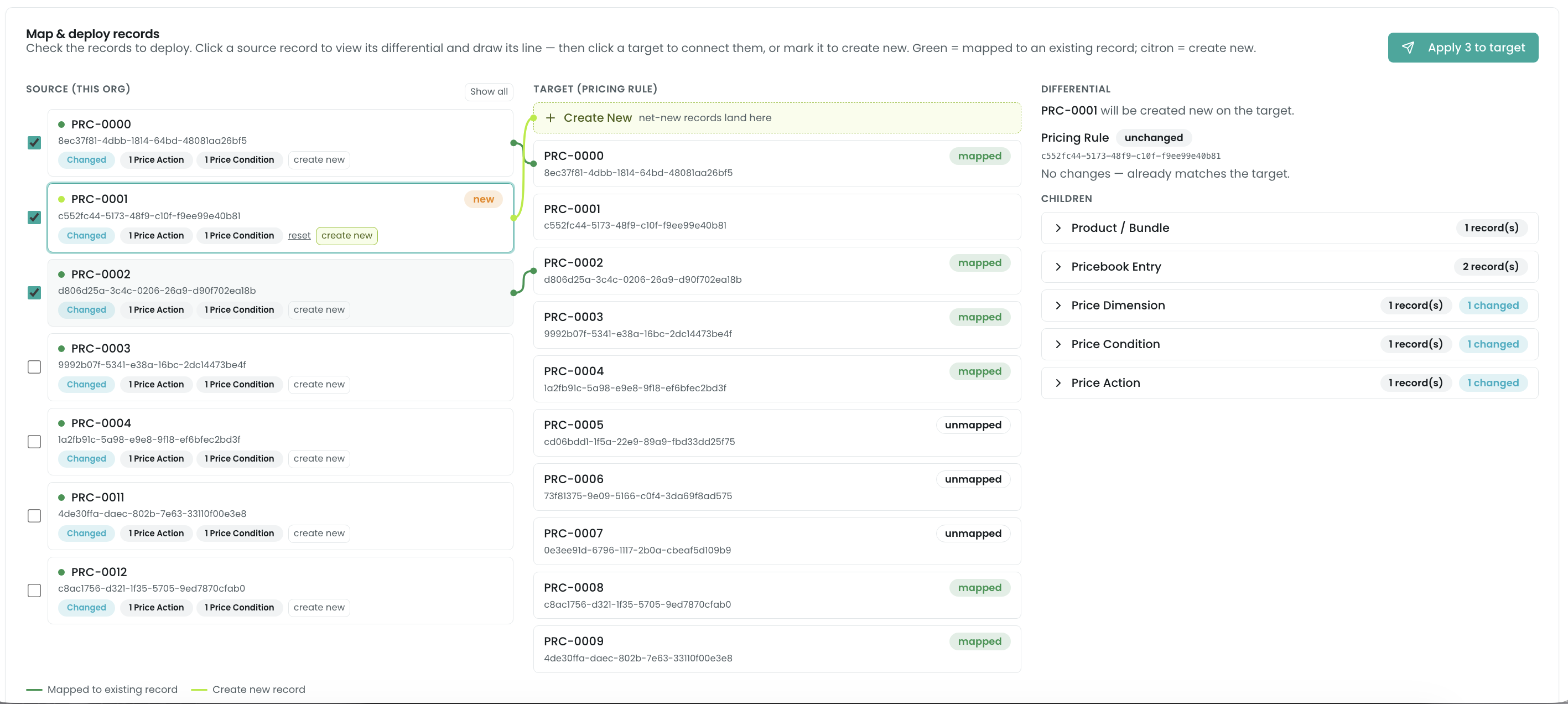
The board has three columns:
- Source (this org) — the parent records in your org.
- Target — the matching object’s records in the target org, with a Create New slot pinned at the top.
- Differential — the field-by-field changes for the record you’ve selected.
Each source row carries an always-visible status dot so you can scan match state without clicking:
- Green — the record auto-matched an existing target record by SyncKey. Promoting it will update that record in place.
- Citron (yellow-green) — the record is create new: it has no match in the target, so promoting it creates a new record there carrying your key.
3. Map records by hand
The two row interactions are deliberately separate:
- The checkbox on a source row adds it to the deploy set — the records that will actually promote when you apply.
- Clicking the row body selects it: it draws a single connector line to its mapped target and shows its differential in the third column.
To change a mapping:
- Connect to a different target — click the source row, then click a target row. The source now maps onto that target. Mapping is one-to-one: if another source already claimed that target, it’s displaced and reverts to its own default (you’ll see a cue on the displaced row).
- Create new — click create new on the source row to map it net-new instead of onto any existing target. Its connector points at the Create New slot at the top of the target column.
- Reset — click reset to drop your manual decision and fall back to the automatic match.
4. Review the differential
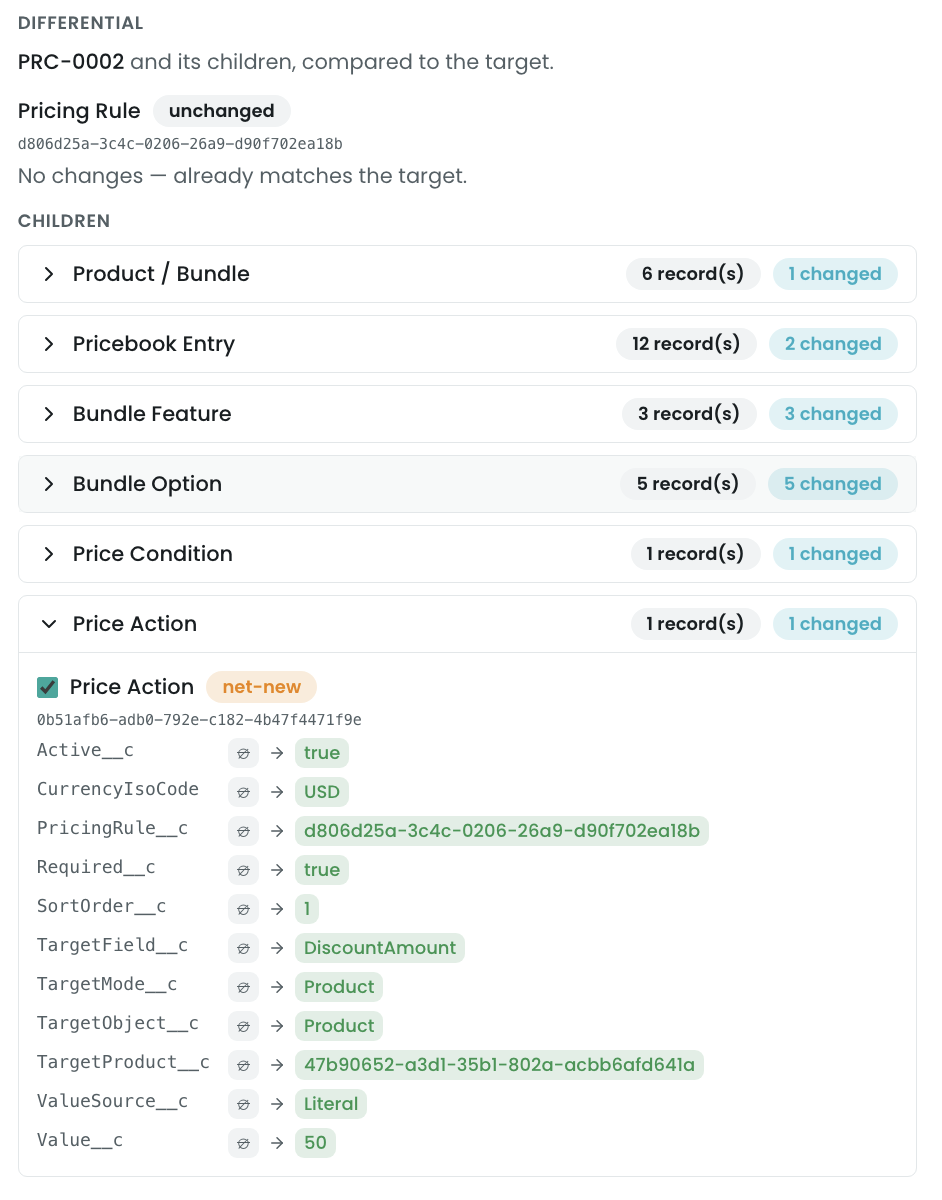
Selecting a source record shows its Differential: the parent’s own field changes (current value → incoming value, with friendly record labels rather than raw IDs), plus its children rolled up by object and expandable. A record being created new is labelled as such; a mapped record shows what will change on the existing target.
Children ride along — opt out per child
Children promote with their parent by default. Under the Children group in the differential, each child has an include/exclude checkbox — uncheck a child to leave it out of this promotion. The group shows an excluded count so you can see at a glance what you’ve held back. Included children promote in full.
A promotion is self-contained — references travel
You don’t have to promote dependencies separately or in any particular order. When you apply a record, Pinion assembles a self-contained bundle that carries everything the record needs:
- Owned composition travels (down). A pricing rule promotes complete with its conditions, actions, and bundle scopes; a product carries its bundle options, attributes, dimensions, discount schedules, and block pricing (down to each block’s conditions). You don’t map these — they ride along inside the parent.
- Referenced records travel too (up). A record the promoted record merely points at (a product a rule references, an attribute a value belongs to) is pulled into the bundle so the import has no dangling reference — and it brings its own owned children with it. Promote a pricing rule that references a product, and that product, its dimensions, its bundle options, its block prices, and its prices all ride along automatically.
So the target ends up complete from a single promotion, and re-running is idempotent (anything already matching is a no-op). The differential reflects this — selecting a parent previews its whole closure against the target.
5. Apply
Check the records you want to promote, then click Apply N to target. Pinion previews the checked set against the target one more time, prunes any children you excluded, and promotes. The Promotion results card then shows the outcome — counts of created, updated, skipped, and failed — and any per-record failure reasons inline.

Related
- Connecting orgs — registering the target the workbench promotes into.
- Cross-org identity & install order — why records auto-match (green) or don’t (and how re-mapping realigns keys).
- Deploy to Sandbox — when you’d rather push the whole catalog than map records one by one.
- Troubleshooting — unresolved references, unstamped records, and blocked promotions.