Approval Rules
Approval Rules let you gate a deal on sign-off: “any discount over 20% needs VP approval,” “deals above $250k route to Finance, then Legal,” “non-standard payment terms require the Deal Desk.” When a quote or opportunity matches an Approval Rule’s conditions, it can’t be finalized until the required approvers sign off.
Approval Rules are the third member of the rules family alongside Product Rules and Pricing Rules — they share the same condition builder — but they’re authored differently and do something different: instead of changing the cart or the price, they route the deal for approval.
What an Approval Rule does
When its conditions match (on a Quote or Opportunity), an Approval Rule requires an approval — it generates approval requests and routes them to the approvers you defined, in the order the chain defines. The deal can’t proceed until the chain resolves (approved) — or it’s sent back (rejected).
Approval Rules are tier-gated:
- Base tier — up to 3 active approval rules; single-step rules only.
- Pinion+ — unlimited active rules and multi-step approval chains (Advanced Approvals).
They’re on by default in a new org (an admin can disable the whole engine via Configurator Settings — see Administration ▸ Settings).
Anatomy — the approval chain wizard
You build an approval flow in the chain wizard — Basics → Steps → Policy → Review (the Create flow button on the Approval Rules tab of the admin Rules area). A chain is the whole approval flow; each step is one approval (one approver or cohort, with its own conditions).
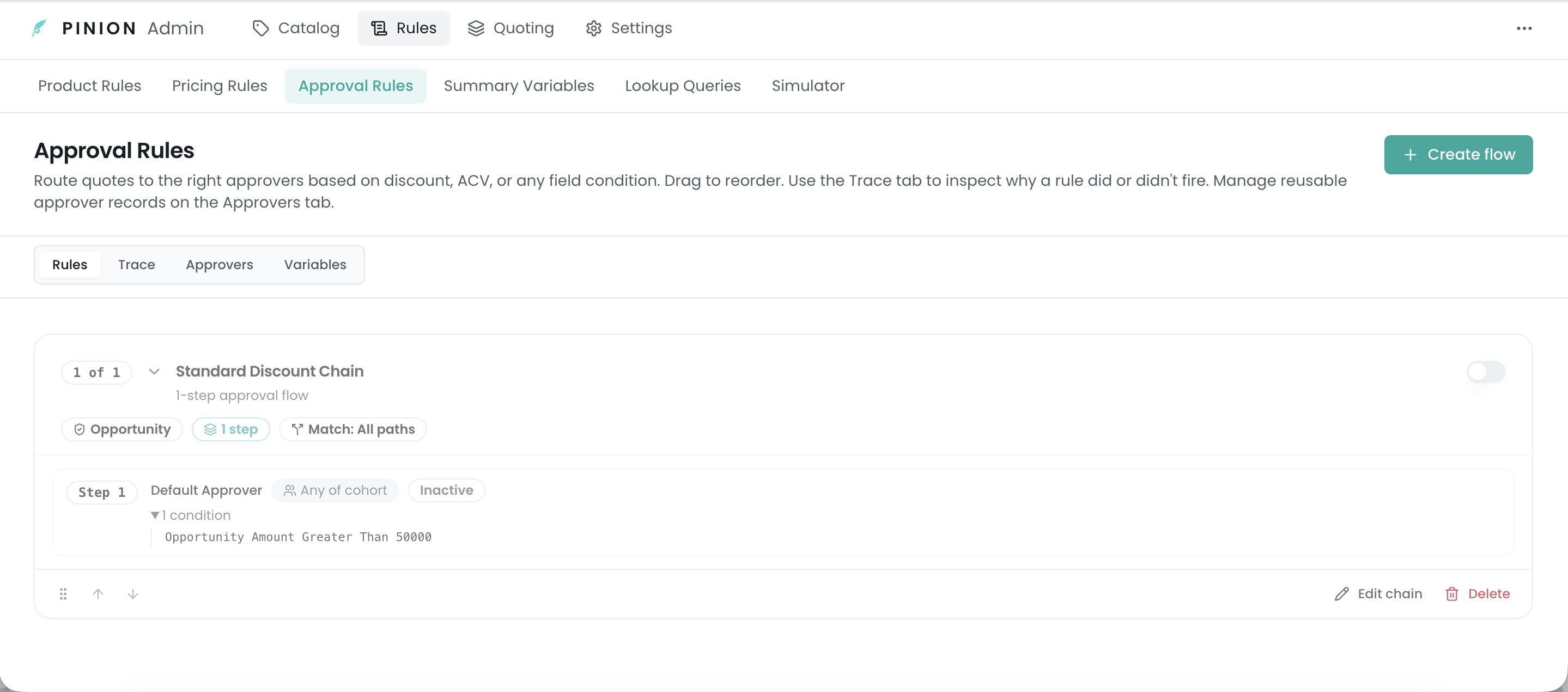
Basics
- Name and Target object — Quote or Opportunity (which record the chain evaluates against).
- Active — only active chains evaluate; counts toward the tier cap.
- Scope product (optional) — restrict the whole chain to deals containing a specific product.
(Chain-wide match policy and consolidate redundant approvers live on the Policy step — see below.)
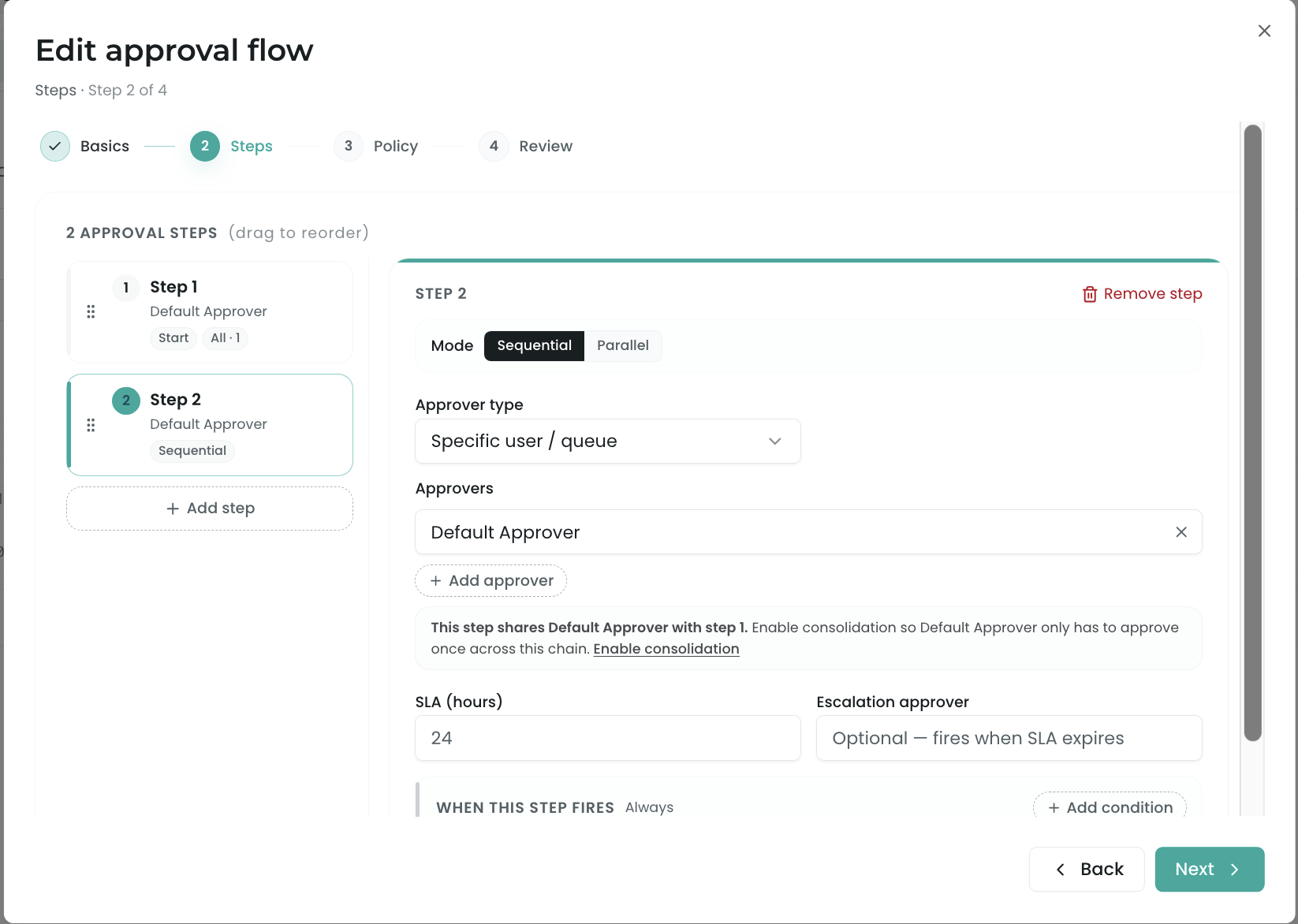
Steps
Each step is one approval. Add and reorder steps (drag to sequence them). Per step:
- Approver(s) — who signs off (see Approvers). A step can be a single approver or a cohort with Any (first to approve wins) or All (everyone must approve) semantics.
- Conditions — each step has its own conditions, so a step only fires when it matches (e.g. step 1 fires over 20% discount, step 2 only over 40%). Same condition builder as Product/Pricing Rules (below).
- SLA (hours) — the time the approver has before the step is overdue; fractional hours are allowed.
- Escalation approver — who the request escalates to if the SLA is breached.
- Sequential vs. parallel — by default a step waits for the previous step to finish; mark a step parallel to fire it alongside the preceding step.
Policy
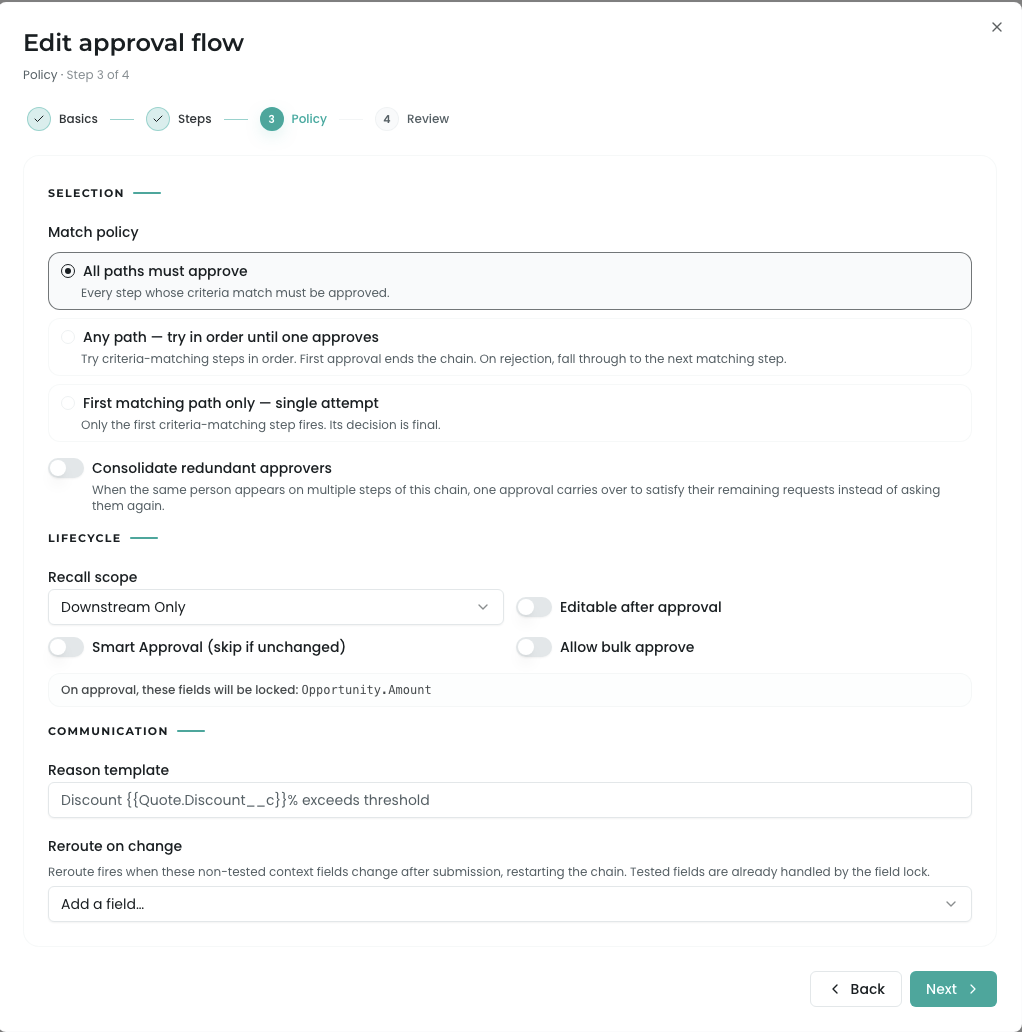
Chain-wide behavior, in three groups:
Selection — how the chain resolves when multiple steps match:
- All paths must approve (default) — every step whose criteria match must be approved.
- Any path — try in order until one approves — try matching steps in order; the first approval ends the chain; a rejection falls through to the next matching step.
- First matching path only — single attempt — only the first matching step fires; its decision is final.
- Consolidate redundant approvers — when the same person appears on multiple steps, one approval carries over to their remaining requests instead of asking again.
Lifecycle:
- Recall scope — when a rep recalls a submitted deal, what’s invalidated: Whole chain, Downstream only, or Only this step.
- Editable after approval — when on, the quote unlocks again once approved (otherwise approved deals are locked); the step also shows which fields it locks on approval.
- Smart approval (skip if unchanged) — if an approver already approved an unchanged version, auto-skip their request.
- Allow bulk approve — let an approver clear multiple pending requests at once.
Communication:
- Reason template — the text shown to approvers, with merge fields (e.g.
Discount {{Quote.Discount__c}}% exceeds threshold), frozen at submit time. - Reroute on change — fields that, if they change after submission, restart the chain by re-resolving approvers (tested fields are already covered by the field lock).
Review
A read-only summary of the chain, its steps, and policy. Save activates it (subject to the tier cap).
Conditions
Approval-rule conditions use the same builder as Product and Pricing Rules — same tested objects (Quote, Opportunity, Account, Product, Bundle Option, Configuration Option, Summary Variable, Dimension), same operators, and the same All / Any / Custom combine logic. See Product Rules ▸ Conditions for the full reference.
Two things are specific to approvals:
- Conditions live per step, not once per rule — each step decides independently whether it fires.
- A third value source is available alongside Literal and Field reference: Variable — see Approval Variables.
Approvers
Define approvers once (the Approvers tab) and reference them from steps. An approver is one of:
- User — a specific person.
- Queue / Public Group / Role — a set of people; for non-user types you choose whether the first to claim approves or all members must.
- Formula approver — resolve the approver dynamically at submit time from a field path, e.g.
Quote.Account.Owner.Manager— so the chain routes to this deal’s approver, not a hard-coded person.
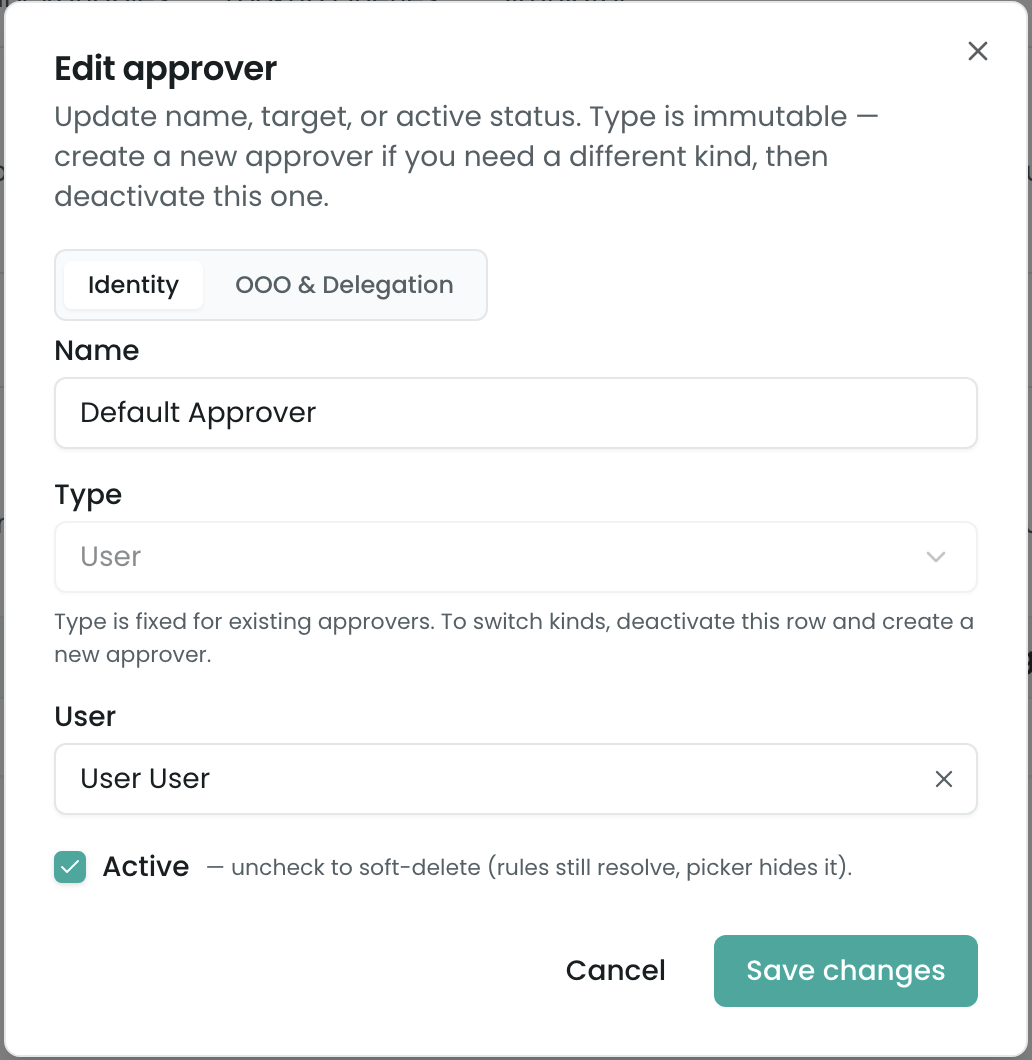
An approver’s Type is set at creation and immutable — to switch kinds, deactivate the row and create a new one. The Active toggle soft-deletes (existing rules still resolve; the picker hides it). Delegation lives on the approver’s OOO & Delegation tab — a delegate user active between two dates, so coverage holds during PTO.
Approval Variables
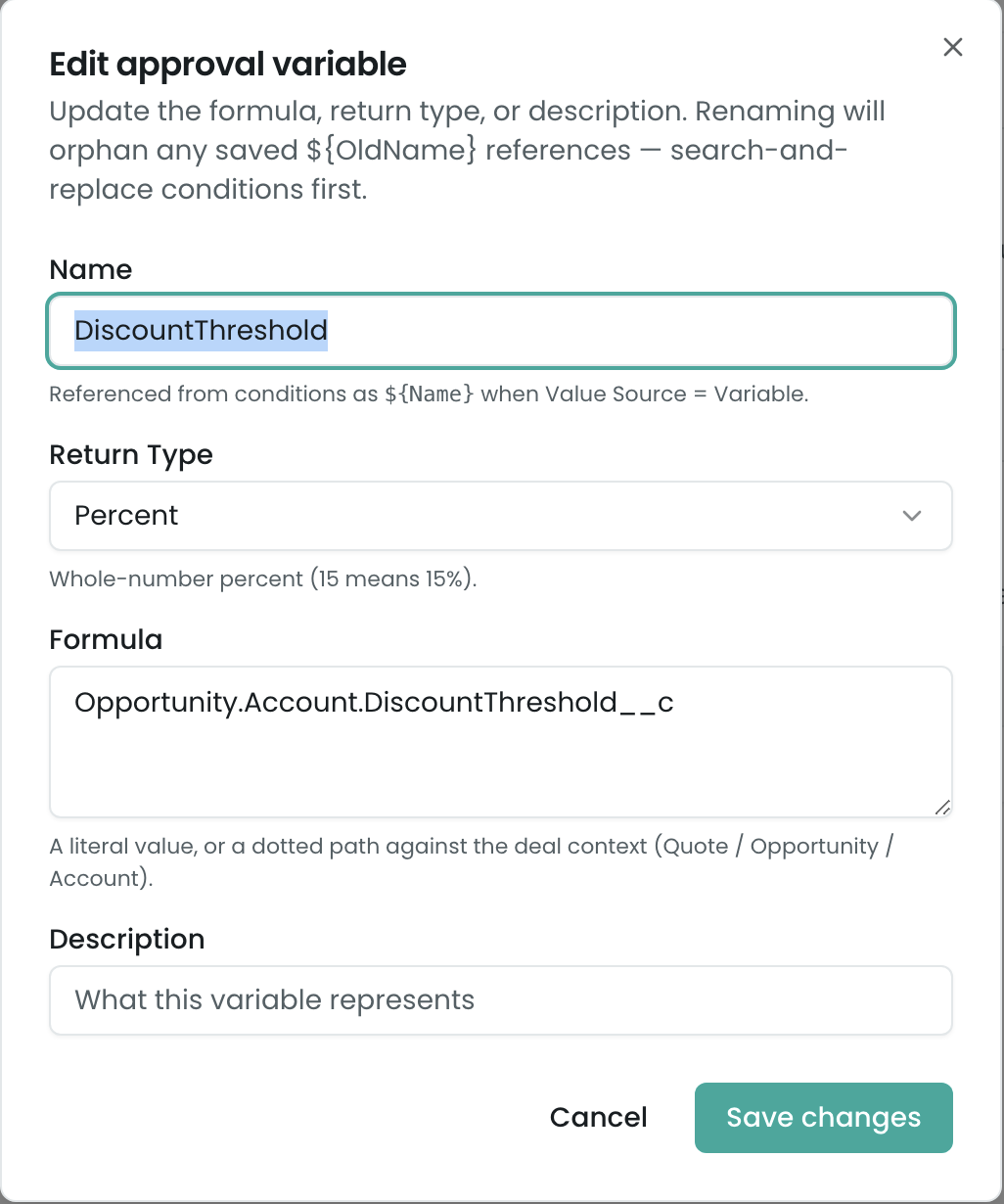
An Approval Variable is a reusable, named threshold or value you reference from conditions (and reason templates). Define it once on the Variables tab — a Formula (a literal like 20, or a dotted path against the deal context like Quote.Account.Industry) plus a Return type (Number / Currency / Percent / Text / Boolean) — then reference it in a condition’s Variable value source as ${VariableName}.
This keeps a threshold in one place: change “max self-serve discount” once and every rule that references it updates. Renaming a variable orphans existing ${OldName} references — search-and-replace conditions first.
What happens at runtime (in brief)
When a deal matches an active Approval Rule, submitting it for approval generates the approval requests and routes them per the chain — sequential or parallel, with SLAs and escalation. Approved deals proceed; rejected ones return to the rep; recall and reroute behave per the policy above.
The full approver experience — submission, the My Approvals queue, approve/reject decisions, delegation in action, the approval trace, notifications, and record locking — is documented in Approvals (§8).
Limits & gotchas
- Active-rule cap (Base tier). Up to 3 active approval rules on Base; inactive rules don’t count. Multi-step chains require Pinion+. The cap is checked when you activate a rule.
- Renaming a Variable orphans its references. Conditions reference an Approval Variable by name (
${Name}); renaming the variable doesn’t update existing${OldName}references — they resolve to null. Rename deliberately. - A condition with no value on a non-null operator is skipped (an
Is Null/Is Not Nullcheck needs no value). - Per-step conditions are independent. A step with no conditions always fires (within the chain’s match policy); scope each step deliberately.
- Match Policy default is All. A chain saved without an explicit policy behaves as “every matching step must approve.”
Related
- Product Rules · Pricing Rules — the shared condition builder (this page cross-references it).
- Approvals — the runtime approver experience (submission, My Approvals, decisions, trace, notifications, locks).
- Summary Variables — aggregate values usable in conditions.
- The Rule Simulator covers Product and Pricing rules; to debug whether an approval routed (and why), use the Approval Trace at runtime — see Approvals (§8).